Technical Support
The Product Support window shows how to reach EZ5 technical support and what to send with a question.
In the General section of the main toolbar, click  Support.
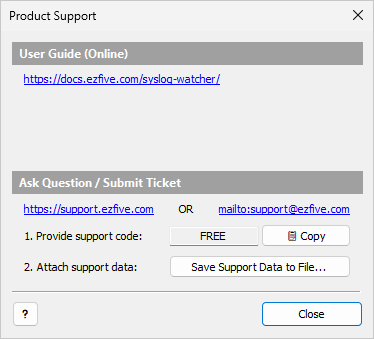
Ask a Question or Submit a Ticket
-
Contact EZ5 in one of these ways (links under Ask Question / Submit Ticket):
-
Support portal: https://support.ezfive.com
-
Email: support@ezfive.com
-
-
Next to 1. Provide support code:, click 📋 Copy and paste the code into your message. The code identifies your license, so EZ5 can help you more effectively.
-
Next to 2. Attach support data:, click Save Support Data to File… and attach the saved
.zipfile.
| If the file is larger than 10 MB, open a ticket first. EZ5 then provides a secure shared folder for the upload. |
Support Data File
The support data file is a zip archive of some Syslog Watcher Server work folders in C:\ProgramData\SyslogWatcher7.
It contains the collector, server, feature, and storage configuration, the diagnostic records, and the installed licenses.
| The support data file does not contain syslog messages, secret strings, TLS certificates, or remote access users. |
User Guide
The Product Support window links to two copies of this User Guide:
| User Guide (Online) |
Opens the guide on the web: https://docs.ezfive.com/syslog-watcher/ |
| User Guide (Offline) |
Shows the folder of the installed offline guide. Click it to open the guide in the browser. If the guide is not installed, the link reads Not installed and opens the download page. |
The offline guide is a separate installer, SyslogWatcher-7.0-UserGuide-enNN.msi, where enNN is the publication number.
Download it from ezfive.com/syslog-watcher/downloads/ and run it on each computer with Manager.
When the offline guide is installed, Help in Manager opens its pages from disk. Otherwise, Help opens the online guide.
| Install the offline guide on computers without Internet access. Manager reads it when it starts, so restart Manager after the installation. |
The User Guide is also available as a PDF file for reading or printing. Download it from the same download page.