Export to DB (ODBC)
Export to DB (ODBC) runs SQL commands, usually an INSERT, on an ODBC data source for each matching message.
| The feature reads messages from syslog storage, so a slow or failing export never blocks collection (see How a Feature Processes Messages). |
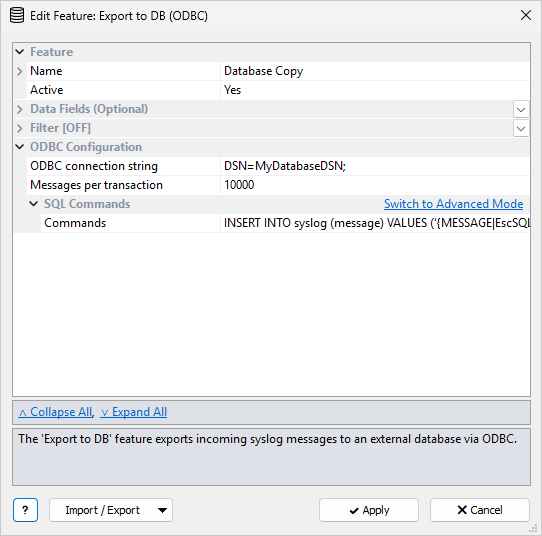
The common Feature, Data Fields, and Filter sections are described in Managing Features. This page covers the ODBC Configuration section.
ODBC Configuration
| Setting | Description |
|---|---|
ODBC connection string |
Required.
Used by the Syslog Watcher Server service, not by Manager.
Click |
Messages per transaction |
Number of messages combined in one SQL transaction ( |
System DSN
The server service runs as Local System by default, so it cannot use a User DSN. Create a System Data Source (System DSN) instead. If the System DSN option is not available in the builder, restart Manager as Administrator.
The builder lists ODBC drivers and data sources on the computer where Manager runs.
When Manager is connected to a remote server, paste a connection string that works on the server, or create the DSN on the server with the 64-bit ODBC Data Source Administrator (%windir%\System32\odbcad32.exe).
SQL Commands
In simple mode, SQL Commands has one Commands template, usually one INSERT.
Example:
INSERT INTO syslog (message) VALUES ('{MESSAGE|EscSQL}');
EscSQL makes the value safe inside an SQL string literal: it doubles single quotes and escapes backslashes, as MySQL expects.
For SQL Server, SQLite, and other databases that treat a backslash as a normal character, use EscSQLANSI instead; it only doubles single quotes.
See Escape Modifiers.
Click Switch to Advanced Mode to define several command groups (Add Commands). Each Commands group has:
-
a Group filter (blank = ALL MESSAGES that passed the feature filter)
-
one or more SQL Commands
For each message, the commands of every group whose filter matches run, in list order. If no group matches, no SQL runs for that message.
Use several groups when messages need different SQL, for example a different table per originator, or INSERT for some messages and UPDATE for others.
A group can also run extra SQL for some messages only, for example a second INSERT into an audit table for severity Error and higher.
| The destination table must already exist; see Destination Table. |
Destination Table
The feature does not create tables, columns, or indexes. Create them in the database first, then write Commands whose column names match.
Do not put CREATE TABLE in the feature commands: it would run for every matching message.
There is no required schema. Choose columns for the fields you need, with types the database can store. Add indexes on the columns you search by, often the received time and the originator.
Example table and a matching insert (SQL Server types; adjust them for your database):
CREATE TABLE syslog (
  received        DATETIME      NOT NULL,
  originator_id   VARCHAR(64)   NOT NULL,
  originator_name NVARCHAR(256) NULL,
  severity        SMALLINT      NULL,
  facility        VARCHAR(32)   NULL,
  message         NVARCHAR(MAX) NULL
);
INSERT INTO syslog (received, originator_id, originator_name, severity, facility, message)
VALUES (
  '{RECEIVED|%Y-%m-%d %H:%M:%S}',
  '{ORIGINATOR_ID|EscSQLANSI}',
  '{ORIGINATOR_NAME|EscSQLANSI}',
  {SEVERITY_NUM},
  '{FACILITY}',
  '{MESSAGE|EscSQLANSI}'
);
{RECEIVED|%Y-%m-%d %H:%M:%S} is the received time in the server time zone, formatted for a datetime column.
See Date/Time Modifiers if the database needs another format.
Use a Unicode large-text type for the message text (NVARCHAR(MAX) on SQL Server).
Notes
-
A large Messages per transaction value improves throughput but delays the commit. If the server stops before a commit, those messages are exported again after it restarts.
-
The ODBC driver must be 64-bit, like the Syslog Watcher Server service.
Related Topics
-
Monitoring Features — database errors show as Failed, and the feature retries