Field Extraction
The Data Fields section takes extra fields out of the message text ({MESSAGE}).
Use them like any other field, in filter expressions and format strings.
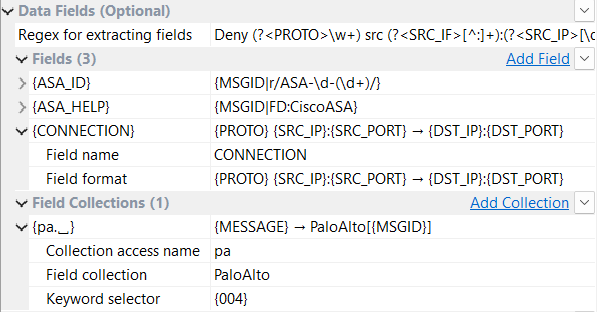
| Regex for extracting fields |
One regular expression with named groups. |
| Fields |
Named format strings. |
| Field Collections |
Stored rule sets that pick a rule per message type. |
Example
Network equipment can log each command run in the configuration console:
%ASA-7-111009: User 'enable_15' executed cmd: show logging mess 106100
The goal is two extra fields: {USER} for the username and {CMD} for the command.
Below are two ways to get them, followed by a comparison.
Regex for extracting fields
One regular expression can capture several fields.
Each named group (?<FIELD_NAME>…) becomes a field {FIELD_NAME}.
For the example line:
User '(?<USER>[^']+)' executed cmd: (?<CMD>.+)
That gives {USER} = enable_15 and {CMD} = show logging mess 106100.
To test the expression on a sample message, use the Regular Expression Editor.
Fields
Click Add Field for each field, then set:
| Setting | Description |
|---|---|
Field name |
The name of the new field, used as |
Field format |
A format string. It can use any field, including those from the regex and collections. |
For the example, each field takes its value from {MESSAGE} with a regular-expression modifier:
| Field name | Field format |
|---|---|
|
|
|
|
For better performance, put a length limit before the regex: {MESSAGE|40|r/User '([^']+)'/} looks for the username only in the first 40 bytes.
|
Results and Comparison
Both methods give the same fields for the example message:
| Field | Value |
|---|---|
|
|
|
|
They differ in how they work:
| Regex for extracting fields | Fields | |
|---|---|---|
When it runs |
For every message, even when none of its fields is used. |
Only when a filter or format string uses the field. An unused field costs nothing. |
Setup |
One regular expression for all fields. |
One format string per field. |
Value |
The captured text as it is. |
Any format string: modifiers, field dictionary lookups, or several fields combined. |
Use Regex for extracting fields for messages with a fixed layout, when most of its values are used. Use Fields for values that are used only sometimes, or to build a value from other fields. Fields can use the regex fields, so the two methods work together.
Field Collections
A field collection applies a stored set of rules and picks one per message type. See Use a Collection.
Regular Expression Editor
Click  Regex Editor… next to Regex for extracting fields to open the expression in a larger window and test it on a sample message.
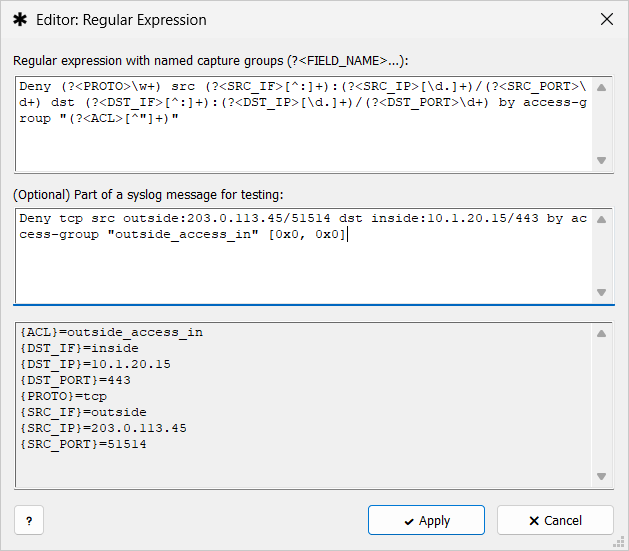
-
Regular expression with named capture groups (?<FIELD_NAME>…): — for example
ip=(?<IP>\S+). -
(Optional) Part of a syslog message for testing: — paste a message body.
-
Result area — the extracted fields as
{FIELD_NAME}=value, or the message No fields were extracted or The regular expression is invalid.