Introduction
Syslog Watcher is a Windows syslog server that receives, stores, and processes syslog messages from network devices, servers, and workstations. Collection, search, processing, and reports run in one product. No external database is required.
How It Is Organized
Syslog Watcher 7 splits collection, processing, and the UI into separate parts.
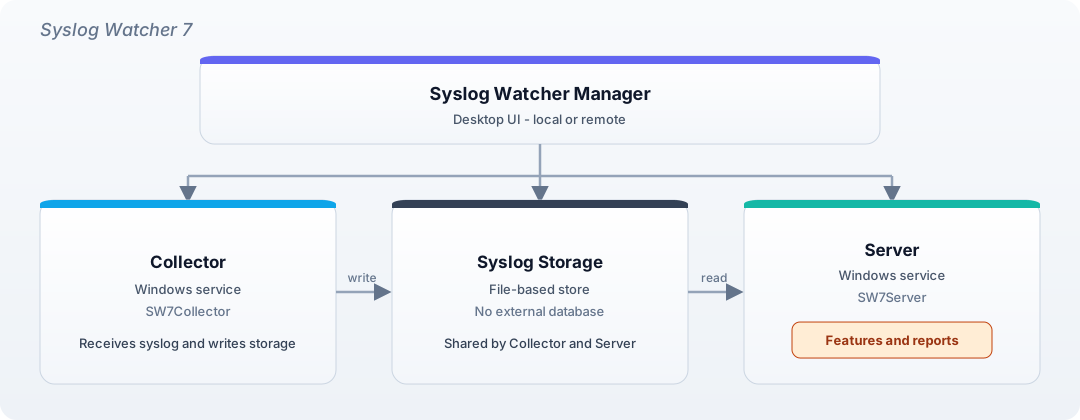
Syslog Watcher Manager
Desktop UI. Opens the local (or a remote) installation, shows status, and changes configuration.
Syslog Watcher Collector
Dedicated Windows service (Syslog Watcher 7 Collector, SW7Collector).
Receives syslog over the network and writes messages to syslog storage.
Collection continues even when the server or Manager is stopped.
See Syslog Collector.
Syslog Watcher Server
Dedicated Windows service (Syslog Watcher 7 Server, SW7Server).
Runs features, reports, and remote Manager access.
Key Features
-
Dedicated collector — receive and store messages independently of the Server and Manager
-
Multi-protocol collection — UDP, TCP, and TLS on any port
-
Syslog storage — file-based store; no external database
-
Features — export to files or ODBC, forward to another syslog server, send emails or HTTP requests, or run a program
-
Message fields and filters — extract fields, format values, and filter by severity, originator, or expression
-
Originators — identify and group sending devices
-
Views — watch and search stored messages
-
Reports — build reports from stored messages
System Requirements
-
Windows 10 / Windows Server 2016 or later (64-bit)
-
Network connectivity to syslog originators (UDP port 514 is the usual default)
-
Administrator privileges for installation
Quick Start
Step 1: Install
-
Download the latest release from ezfive.com/syslog-watcher/downloads/.
-
Run the Syslog Watcher 7 installer and accept the EULA.
-
Select the installation directory and finish the installation.
After installation:
-
Program files in
C:\Program Files\Syslog Watcher 7\(or the folder chosen at install) -
Syslog Watcher 7 Server (
SW7Server) and Syslog Watcher 7 Collector (SW7Collector) registered as Windows services, set to start automatically -
Work files in
C:\ProgramData\SyslogWatcher7\ -
Syslog storage in
C:\ProgramData\SyslogStorage7\
Step 2: Migrate from Version 6 (if present)
If Syslog Watcher 6 data is on this computer, Manager opens Migrate from Version 6 after connecting to the local server. The conversion is automatic.
Step 3: Check Network Interfaces
A UDP listener on all addresses (0.0.0.0), port 514, is added automatically.
That works for many default-configured originators.
Add TCP or TLS, or more UDP listeners, in Network Interfaces.
Prefer Syslog over TLS when originators support it.
Step 4: Configure Originators
Point each syslog originator — workstations, servers, and network equipment — at the IP address of the Syslog Watcher computer. Incoming IDs appear in Syslog Originators when automatic adding is on.
Step 5: Start and Monitor
The collector is set to start automatically with Windows, but it does not start at the end of installation. Start it once after the initial configuration (Server toolbar → Collector → Start Syslog Collector). That first start is left manual so listeners and other collector settings can be applied before collection begins. Later reboots start the collector automatically.
What’s Next
-
Network Interfaces — add TCP, TLS, or extra UDP listeners
-
Syslog Collector — pipeline, storage, service, and troubleshooting
-
Syslog Originators — register, group, and select sending devices
-
Syslog Messages — fields, formatting, and filters
-
Syslog Server — Server service and remote Manager access
-
Features — export, forward, email, HTTP, and scripts
-
Syslog Reports — generate or schedule analysis of stored messages
-
License Management — install, select, or evaluate a license
-
Technical Support — support code and support data