Field Collections
Many vendors send only values, without field names, and what each value means depends on the message type. A field collection turns those values into named fields.
A collection is a list of keywords, each with an extraction rule.
For each message, a keyword selector, such as {MSGID} or the log type in the message, picks the rule.
There are two types:
| Type | Each keyword has |
|---|---|
RegExp Extractors |
A regular expression with named groups |
CSV Field Names |
A comma-separated list of names for the values |
The fields are named {ACCESS_NAME.FIELD_NAME}.
You set the access name when you add the collection to a Data Fields section.
Field Collections Window
In the Storage section of the main toolbar, click  More → Field Collections…
The list is grouped by From: Installation (read-only, shipped with the product) and Syslog Storage.
The installation includes PaloAlto: CSV field names for Palo Alto log types (AUDIT, AUTHENTICATION, CONFIG, SYSTEM, THREAT, TRAFFIC, and more).
Field Collection
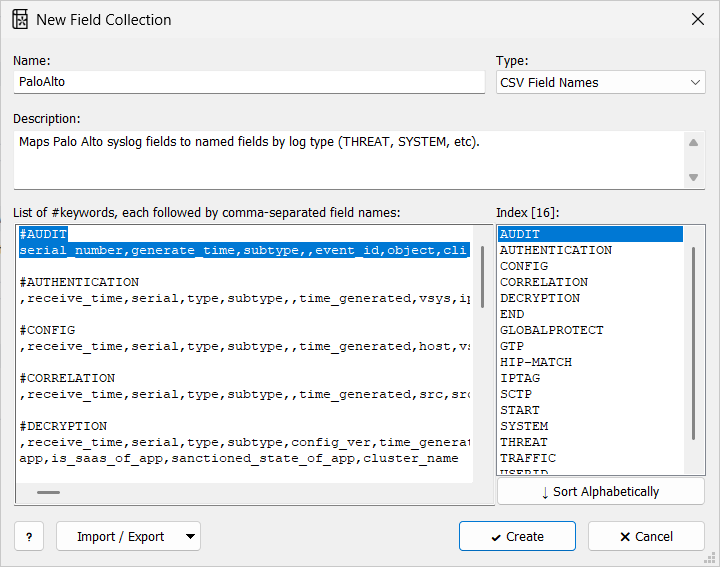
| Setting | Description |
|---|---|
Name: |
Required, unique. You choose the collection by this name in the Field collection setting. |
Description: |
Optional. |
Type: |
RegExp Extractors or CSV Field Names. |
List of #keywords, each followed by …: |
The label ends with a field extractor expression or comma-separated field names, depending on Type:.
Each keyword on its own line starting with |
The Index list shows the keywords and the default as [DEFAULT]. Click a keyword to jump to its entry. Sort Alphabetically puts the entries in keyword order.
Example: RegExp Extractors
#EXAMPLE-MSG1
ip=(?<IP>\S+)

#EXAMPLE-MSG2
IP:(?<IP>\S+)
With Keyword selector {MSGID}, an EXAMPLE-MSG1 message gets IP from ip=…, and an EXAMPLE-MSG2 message gets it from IP:….
Example: CSV Field Names
A parser with the Header: IETF/BSD-syslog and Body: Comma-Separated Values sections splits a Palo Alto message into values 001, 002, ….
The fourth value, 004, is the log type, such as SYSTEM or TRAFFIC.
#SYSTEM
,receive_time,serial,type,subtype,,time_generated,vsys,eventid,object,...
With Keyword selector {004} and access name pa, a SYSTEM message gets {pa.receive_time}, {pa.serial}, {pa.eventid}, and so on.
The built-in Palo Alto Networks Devices parser uses the collection this way.
Use a Collection
-
Open the Data Fields (Optional) section of a feature, view layout, parser, or report template.
-
Under Field Collections, click Add Collection.
-
Set:
Setting Description Collection access name
Prefix of the field names:
{ACCESS_NAME.FIELD_NAME}.Field collection
The collection to apply.
Keyword selector
Format string that gives the keyword for each message, for example
{MSGID}or{004}. When no keyword matches, the collection’s default rule is used, if it has one.
To list all fields of one collection, for example in a view layout’s details panel, put the access name and a dot before the *:
{pa.*|<tr><td>{FIELD_NAME}</td><td>{FIELD_VALUE|EscHTML}</td></tr>}