Syslog Storage
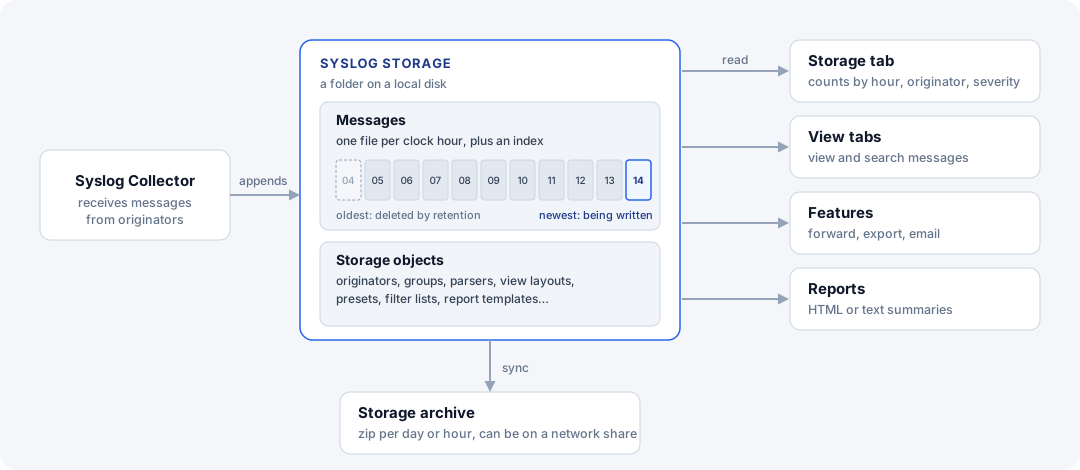
Syslog storage is the local file-based database where the collector writes every message it receives. No external database is required.
View tabs, features, and reports all read from the storage. The collector only appends to it, so the storage works as a large buffer: collection continues even when a feature or report is slow or stopped.
The storage holds two kinds of data:
-
Messages — one file per clock hour, plus an index.
-
Storage objects — originators, groups, parsers, view layouts, View/Search presets, filter lists, field collections, field dictionaries, report templates, and severity and facility names.
Storage Button
What the  Storage button in the Storage section of the main toolbar does depends on what Manager is connected to:
| Manager is | The Storage button |
|---|---|
Connected to the local server |
Opens a drop-down with Syslog Storage Location…, Storage Settings…, and Test Storage Speed… |
Connected to a remote server |
Opens Storage Settings. |
Not connected to a server |
Opens a drop-down with Open Storage Folder…, or Close Storage when a storage folder is open. |
Time Zone
Calendar days on the Storage tab and the RECEIVED field use the time zone of the Syslog Watcher Server computer.
When Manager opens a storage folder without a server, it uses the time zone of the Manager computer.
The Storage tab status bar shows the time zone in use.
Use RECEIVED_UTC when a value must follow UTC.
The server reads the time zone when its service starts. After changing the Windows time zone, restart the Syslog Watcher Server service.
Each storage also records the server time zone when it is created, and daily archive files use that recorded time zone. It differs from the current server time zone when the storage was created in another time zone: on another computer, before the computer’s time zone was changed, or by Syslog Watcher 6 (after a migration from version 6).
In This Section
-
Storage Location and Limits — move the storage, set retention limits
-
Storage Overview — what the storage contains, by day, hour, and originator
-
Storage Maintenance and Archive — enforce retention, keep a compressed copy
-
Open a Storage Folder Without a Server — view an extracted archive or a copied storage
-
Test Storage Speed — measure the disk write rate