HTTP Endpoints
An HTTP endpoint holds the web server settings that the Syslog Watcher Server uses to send HTTP requests: address, request type, headers, and authentication. You set them up once and select the endpoint by name in the Send HTTP Requests feature, which adds the resource path and body for each message.
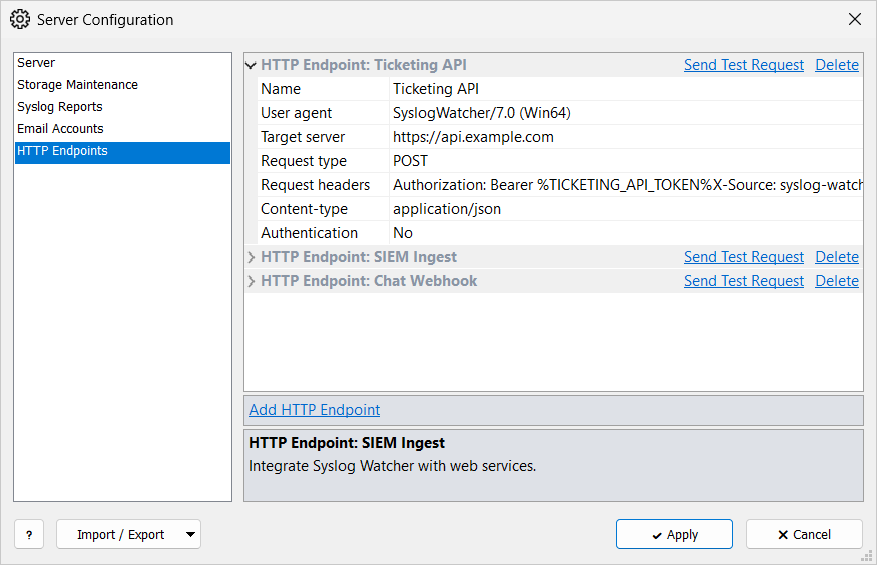
Add an Endpoint
-
In the Server section of the main toolbar, click
 Server →
  Server Configuration…
 -
Select the HTTP Endpoints page.
-
Click Add HTTP Endpoint.
-
Fill in the endpoint settings.
-
Click Apply.
HTTP Endpoint
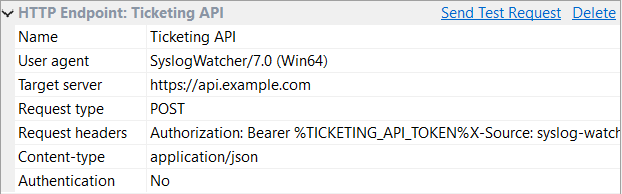
| Name |
Name shown in the feature. Required. |
| User agent |
|
| Target server |
Address with protocol and optional port, for example |
| Request type |
POST or PUT. |
| Request headers |
Optional headers, one per line, for example an API key:
|
| Content-type |
|
| Authentication |
None or Basic. With Basic, Username and Password are required; use a secret string for the password. |
Send a Test Request
-
Click Send Test Request on the endpoint.
-
Enter a Resource path (for example
/api/send-message) and a Request body. -
Click Send Request.
The window shows the Status code and the body of the web server’s response, or the error.
The request is sent from the Syslog Watcher Server computer.
| Use a body in the same format as the feature template, for example a small JSON object. |
Delete an Endpoint
Click Delete on the endpoint, confirm, and click Apply.
| Features that use the endpoint stop sending until another endpoint is selected. |
Related Topics
-
Escape Modifiers:
EscJSONandEscURL