Managing Originators
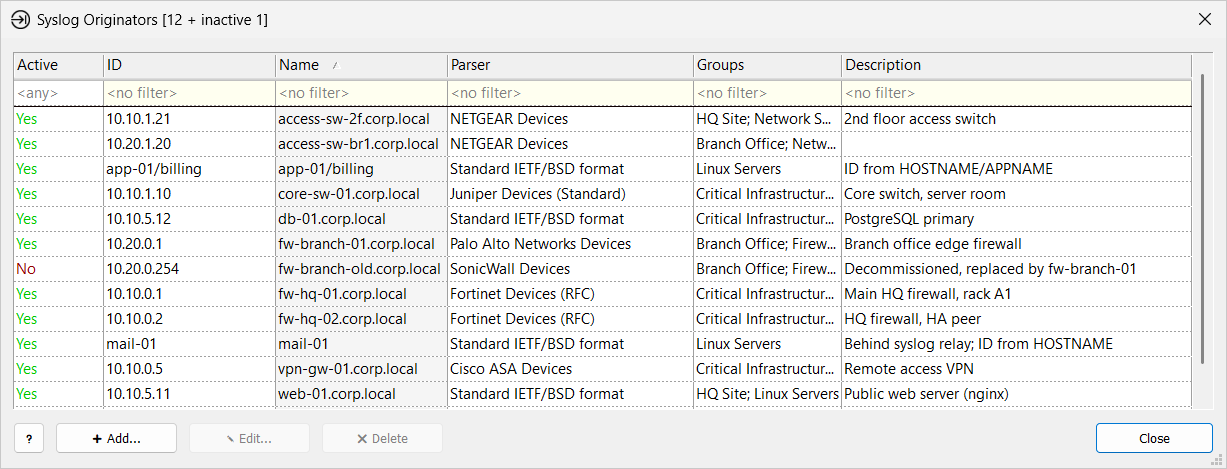
The Syslog Originators window lists every originator in syslog storage. Use it to set an originator’s name, parser, and groups, to deactivate originators, or, in rare cases, to add one before it starts sending.
Open it in one of these ways:
-
► In the Storage section of the main toolbar, click
 Originators.
The button is shown when Manager is connected to a server or has a storage folder open.
Originators.
The button is shown when Manager is connected to a server or has a storage folder open. -
► On the Server tab, click Originators.
Add an Originator
You rarely need to: the collector adds originators automatically when If originator ID is unknown is Add new originator. Add one manually when that setting is Discard messages, or to set the name, parser, and groups before the first message arrives.
-
Click Add… or press Insert.
-
If Manager is connected to a server that adds originators automatically, it asks whether you still want to add one manually. Click Yes.
-
In the New Syslog Originator window, enter the ID and Name, and set the other properties.
-
Click Create.
The ID must match the ID the collector assigns to the originator’s messages: in simple cases its IP address, otherwise the value extracted by an originator ID rule.
Edit Originators
-
Select one or more originators.
-
Click Edit…, double-click the row, or press Enter.
-
Change the properties and click Apply.
When you select several originators, the Edit Multiple Syslog Originators window shows only Active, Parser, and Groups. If a value differs across the selection, it shows as <different states> or <different parsers>. A group that contains only some of the selected originators shows a mixed check box. Values you do not change are kept as they are.
Delete Originators
-
Select one or more originators.
-
Click Delete or press Delete.
-
Confirm with OK.
| Deleting removes the originator record and its group memberships. Its messages stay in syslog storage. |
If a deleted originator sends again and automatic adding is on, the collector adds it as a new originator with the default parser and no groups.
| To stop storing messages but keep the settings, deactivate the originator instead. |
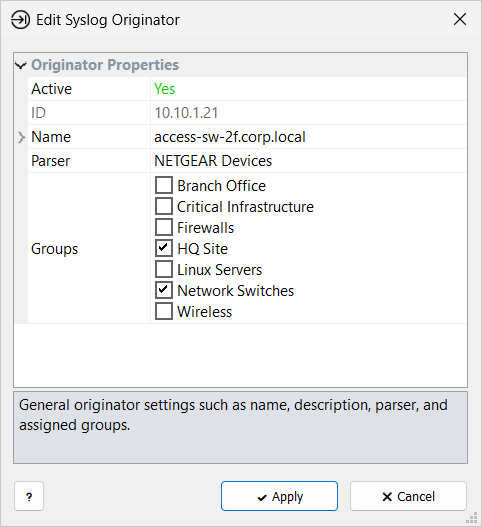
Originator Properties
| Active |
Whether the originator is in use. If No, it is inactive: the collector discards its new messages, and view tabs, reports, and features skip its stored messages. Inactive originators do not count toward the license limit. New originators are active. |
| ID |
Unique originator ID; in simple cases, the originator’s IP address. Required; it cannot be changed after the originator is created. |
| Name |
Required display name, used in the Manager lists, filters, and reports. |
| Description |
Optional comment, shown under Name. |
| Parser |
The parser for this originator’s messages. New originators get the default parser. Parsers whose names start with Installation: ship with the product. If you choose one, Manager offers to copy it to syslog storage when you click Apply or Create, and assigns the copy. |
| Groups |
Check the groups this originator belongs to. Shows <no groups> if no groups exist. |
Select Originators Window
The Select Originators window opens when you choose <select originators> in a message filter or click Select Originators… in the group properties.
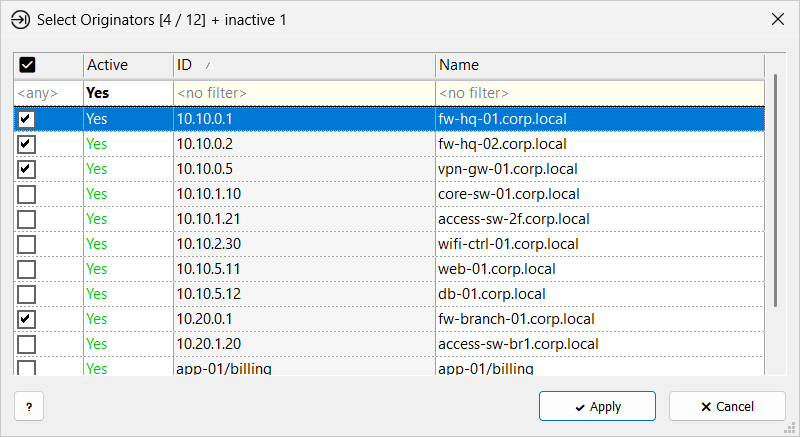
Check the originators to include, then click Apply.
-
Click a check box to check or clear one originator.
-
To change several, select the rows, then press Space or double-click to invert their checks, or right-click and choose Set Checkmarks, Clear Checkmarks, or Invert Checkmarks.
The window opens with Active set to Yes in the filter row, so only active originators are listed. Choose <any> to show inactive ones too. In the other columns of the filter row, type text to show only the rows that contain it; case is ignored. In the check box column, choose Yes or No to show only checked or unchecked originators.
The title shows the number of checked originators and the number of active originators, for example Select Originators [3 / 12]. It adds + inactive N if checked originators are inactive, and + deleted N if the filter lists deleted originators. A deleted originator is an ID that a message filter still lists but that is no longer in storage. It is shown grayed out, cannot be checked or cleared, and is removed from the filter when you click Apply.
A message filter with no originators selected includes all originators. If no originators are left when you click Apply, for example because you cleared them all or all of them were deleted, Manager warns you first.
Read-Only Access
You cannot change originators when the storage folder is open read-only, or when your role on a remote server is Observer. In that case:
-
The Syslog Originators window title shows (Read Only). Add… and Delete are unavailable, and Edit… becomes View….
-
The originator properties window is titled Originator (Read Only), or Properties of Multiple Originators (Read Only) for several originators, and Apply is unavailable.
Related Topics
-
Syslog Originators — what originators are and how the collector registers them