Filter Expressions
A filter expression selects messages using message fields, comparison operators, and / or / not, and parentheses.
An empty expression matches every message that already passed severity and originators.
| Narrow by severity and originators on the message filter first. They use storage indexes, so they are much faster than an expression. |
Syntax
A comparison is a field in braces, an operator, and a value (quoted text or an unquoted number).
{APPNAME} = "sshd"
Field names can include modifiers:
{MESSAGE|lower} CONTAINS "blocked"
Put text values in double quotes.
To include a " in the value, double it:
{MESSAGE} CONTAINS "begin ""quoted part"" end"
Write operators in uppercase: CONTAINS, not contains.
Text comparisons are case-sensitive.
{MESSAGE|lower} (or UPPER) makes a case-insensitive comparison; write the value in the same case:
{MESSAGE} CONTAINS "error"         matches "error" only
{MESSAGE|lower} CONTAINS "error"   matches "error", "Error", and "ERROR"
and / or / not
Logic keywords are lowercase: and, or, not.
AND, OR, and NOT are invalid.
Use parentheses to group conditions, especially when an expression mixes and and or.
{APPNAME} = "sshd" and {MESSAGE} CONTAINS "Failed password"
{APPNAME} = "sshd" or {APPNAME} = "sudo"
not {MESSAGE} CONTAINS "test"
({APPNAME} = "sshd" or {APPNAME} = "sudo") and {MESSAGE} CONTAINS "root"
Operators
| Operator | Meaning |
|---|---|
|
Equal / not equal (text). |
|
Quoted values compare as text, character by character, so |
|
Substring (case-sensitive). |
|
Prefix / suffix (case-sensitive). |
|
The value is / is not an item of a filter list. |
|
The whole field matches a regular expression (case-sensitive / ignore case). |
|
Part of the field matches a regular expression (case-sensitive / ignore case). |
Integer Comparison
With an unquoted number (digits, optionally a leading minus), < <= > >= compare as integers.
A field value that does not start with a number counts as 0.
{MSGID} > 404
Quoted digits compare as text, so {MSGID} > "404" is a text comparison.
Filter Lists
IN is true when the value equals an item of the named list exactly; NOT_IN is the opposite.
{APPNAME} IN "allowed_apps"
{MSGID|lower} NOT_IN "known_errors"
See Filter Lists.
Regular Expressions
Patterns use Perl syntax.
RE_MATCHES requires the entire field to match.
RE_CONTAINS succeeds when the pattern occurs anywhere in the field.
The _I forms ignore case.
Messages that contain an email address:
{MESSAGE} RE_CONTAINS ".+\@.+\..+"
Instead of the _I operators, you can start the pattern with (?i).
(?i:…) makes only that part case-insensitive:
{MESSAGE} RE_CONTAINS "user (?i:admin|root)"
Limits
An expression can be up to 64 KB long and nested up to 256 levels deep (and / or / not / parentheses).
A longer or deeper expression is rejected.
Filter Expression Editor
Click  Editor… next to a filter expression setting to open it in a larger window.
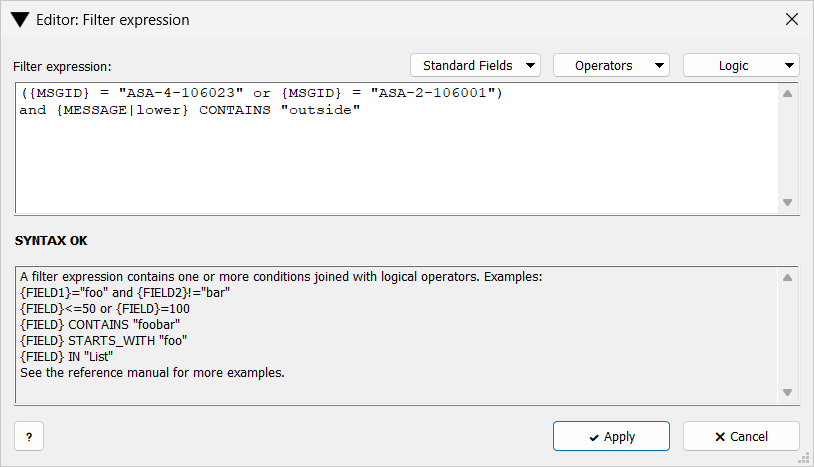
-
Filter expression: — where you type the expression.
-
Standard Fields, Operators, Logic — drop-downs that insert a field, an operator, or
and/or/notat the cursor. -
Result line — SYNTAX OK, or INVALID SYNTAX with the reason, updated as you type.
-
Bottom pane — syntax examples.