Incoming Filter
The Filter section on the Message Processing tab discards unwanted messages as soon as they are received — before the memory buffer and before syslog storage.
While no criterion is set, the filter is off and the section header reads Filter [OFF].
When It Runs
Most filtering in Syslog Watcher uses the message filter on stored messages (features, views, reports). The incoming filter runs before storage:
-
Discarded messages take no storage space and no place in the memory buffer.
-
Discarded messages get no further processing (originator handling, features).
-
Only simple criteria are available: the message is not parsed at this stage.
Use it to drop high-volume, low-value traffic (for example debug-level noise) before it reaches storage. It is the cheapest way to reduce storage load; see Performance.
Discarded messages are counted on the Server tab as Filtered (severity) or Filtered (content); see Monitoring.
Filter Settings
A message must pass every criterion that is set. The criteria are checked in this order: severity, Accept only messages with keywords, Discard messages with keywords, regular expression.
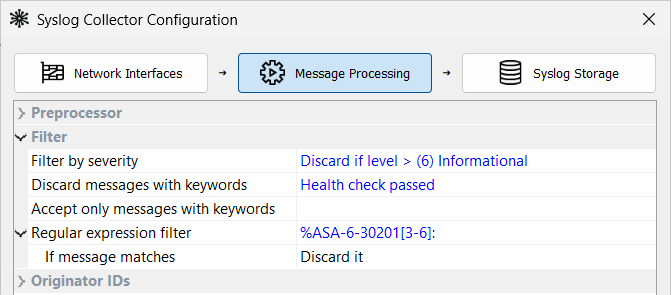
| Filter by severity |
Do not discard (accept all levels), or Discard if level > (N) <name>. For example, Discard if level > (4) Warning discards (5) Notice, (6) Informational, and (7) Debug messages from all originators. |
| Discard messages with keywords |
Deny list: a message that contains any of the keywords is discarded. |
| Accept only messages with keywords |
Allow list: a message that contains none of the keywords is discarded. |
| Regular expression filter |
Pattern searched for anywhere in the message. Leave it blank to turn this criterion off. |
| If message matches |
Accept it: only matching messages are kept; all others are discarded. |
| Enter one keyword per line; press Ctrl+Enter for a new line. An empty list turns that criterion off. |
How Text Is Matched
Keywords and the regular expression are matched against the message as received:
-
The
<PRI>part is removed; the rest of the syslog header (timestamp, host name) is included. -
Matching is case-sensitive. In a regular expression,
(?i)at the start makes it case-insensitive. -
Text is matched before the encoding conversion, in the encoding the originator sent, while keywords are saved in UTF-8.
-
The regular expression uses Perl syntax.
Example: a Cisco ASA firewall logs every connection it opens and closes at (6) Informational, often thousands of messages per second:
Oct 12 2026 08:15:00: %ASA-6-302013: Built outbound TCP connection 4711 for outside:203.0.113.10/443 (203.0.113.10/443) to inside:10.1.1.25/51544 (10.1.1.25/51544)
Oct 12 2026 08:15:04: %ASA-6-302014: Teardown TCP connection 4711 for outside:203.0.113.10/443 to inside:10.1.1.25/51544 duration 0:00:04 bytes 5120 TCP FINs
To drop these messages and keep all other Informational messages from the firewall, set Regular expression filter to %ASA-6-30201[3-6]: and If message matches to Discard it.
The pattern matches message IDs 302013–302016: TCP and UDP connections built and torn down.
| Discarded messages are lost. After changing keywords or the pattern, watch Filtered (content) on the Server tab. |
Incoming Filter and Message Filter
| Incoming Filter | Message Filter | |
|---|---|---|
When it runs |
When a message is received, before storage |
After the message is in storage |
Available criteria |
Severity, keywords, regular expression on the raw message |
All parsed fields (originator, facility, message body, timestamps, custom fields) |
Effect |
The message is never stored |
Features, views, and reports include or exclude the message |
Use for |
High-volume noise reduction |
Fine-grained routing, export, and reporting |