Test Storage Speed
Test Storage Speed measures how many messages per second syslog storage can write to a disk. The test writes generated messages the same way the collector writes received ones.
| The test generates messages of all eight severity levels, which is rare in practice: most originators send only two or three. Fewer severity levels make indexing faster, so real performance is usually noticeably higher than the test result. |
Use it to:
-
► Check a disk before moving the storage location to it.
-
► Estimate hardware for an expected message rate.
-
► Find out whether storage is the bottleneck when the buffer usage stays high.
Run the Test
-
Make sure Manager is connected to the local server.
-
In the Storage section of the main toolbar, click
 Storage → Test Storage Speed…
 -
Set the test parameters.
-
Click
 Start Test.
The first results appear after about 5 seconds.
Start Test.
The first results appear after about 5 seconds. -
Let it run for a minute or more, then click
 Stop Test.
The test waits for queued messages to be written and deletes the test files.
Stop Test.
The test waits for queued messages to be written and deletes the test files.
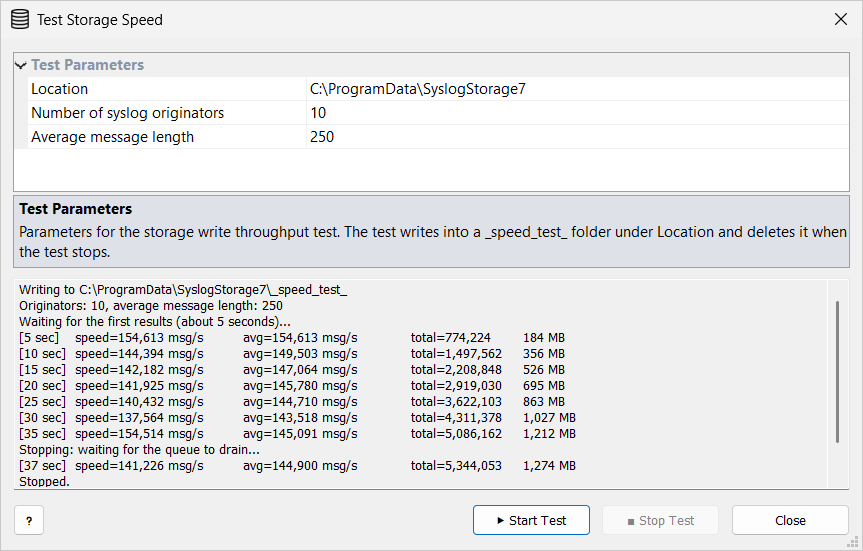
|
The test writes real data to the disk, which slows down other work on that disk. Run it outside busy hours when testing the disk that holds the live storage. |
Test Parameters
| Setting | Initial | Description |
|---|---|---|
Location |
Storage folder |
Folder on the disk to test.
The test creates a |
Number of syslog originators |
10 |
Rough estimate of the real number of originators (1–100000). Storage writes per originator, so this value affects the result. |
Average message length |
250 |
Average message body length in bytes (50–10000). |
Messages get random severities, weighted toward the less important levels.
Results
A new result line appears every 5 seconds:
| Value | Meaning |
|---|---|
|
Time since the start. |
|
Messages per second in the last interval. |
|
Average messages per second since the start. |
|
Messages written, followed by the data size. |
Read avg once it stops changing much.
Keep the peak incoming message rate well below it: the collector also parses messages, and features and view tabs read from the same disk.