Remote Access
With remote access, you can manage a Syslog Watcher Server from Syslog Watcher Manager on another computer. Remote users sign in with a username and password; each user’s role defines what they can view and change. To set up remote access, enable it on the server computer and add users. Then connect from Manager on the other computer.
Enable Remote Access
On the server computer, connect Manager to the local server, and then:
-
In the Server section of the main toolbar, click
 Server →
  Server Configuration…
 -
Select the Server page.
-
Set Allow remote access to Yes.
-
Check Port and Connection.
-
Click Apply.
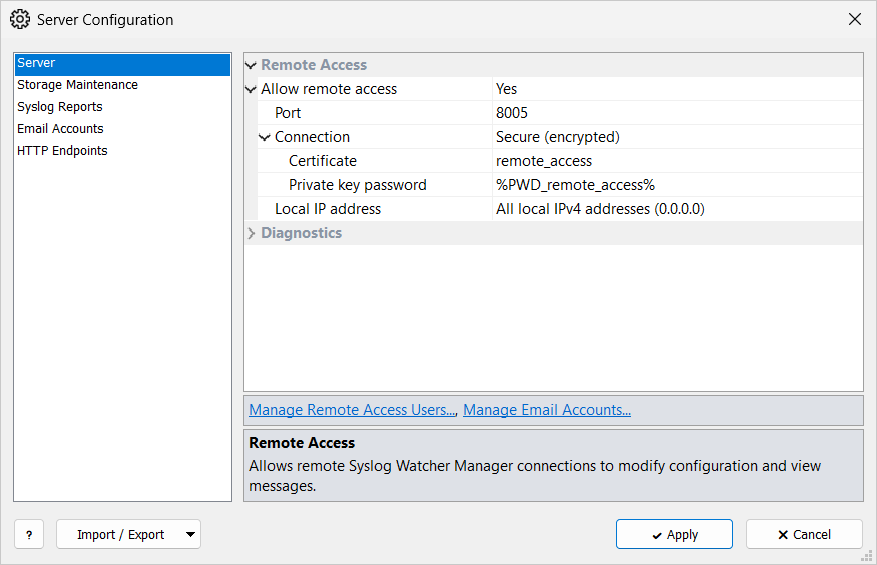
If no users exist yet, Manager warns and opens Remote Access Users. Add at least one user; without users, no one can sign in.
| Allow remote access |
Yes lets Manager connect from other computers. |
| Port |
TCP port for Manager connections (1–65535). |
| Connection |
Plain (unencrypted) or Secure (encrypted). The Protocol in Manager’s connection settings must match. |
| Certificate |
Certificate for Secure (encrypted), selected by name from TLS Certificates. The button next to the field opens the TLS Certificates window. |
| Private key password |
Password for an encrypted private key.
When you select a certificate whose key password is stored as a secret string, the field is filled with that secret ( |
| Local IP address |
Local address to listen on.
|
Secure Connection
When you set Connection to Secure (encrypted) and no certificate is selected, Manager generates a self-signed certificate named remote_access and selects it.
The certificate has this computer’s name as Common Name (CN), a 2048-bit key, and is valid for 3650 days (10 years).
Its key password is stored as the secret PWD_remote_access.
To use your own certificate instead, import it in TLS Certificates and select it in Certificate.
Remote Access Users
In the Server section of the main toolbar, click Server → Remote Access Users…
On the Server page of Server Configuration, Manage Remote Access Users… opens the same window.
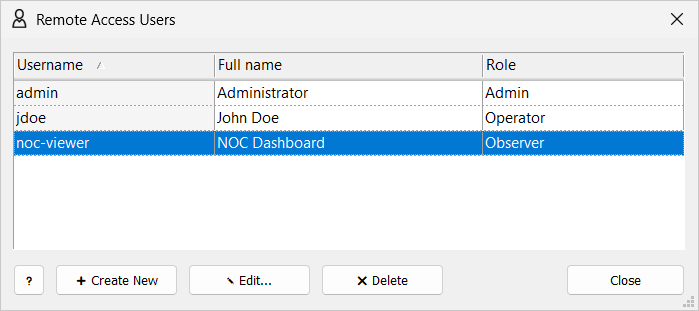
Users who cannot manage other users see Remote Access Users: Self Only with only their own account, which they can edit.
Add a User
-
Click Create New.
-
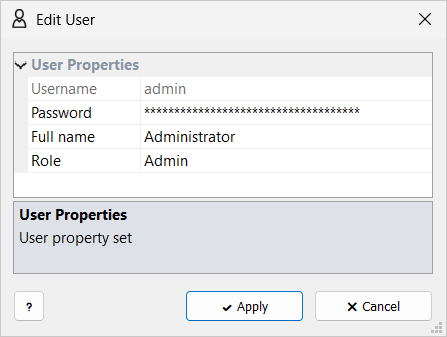
Fill in the user properties.
-
Click Create.
The first user is prefilled as admin with full name Administrator and role Admin.
Further users start with the role Observer.
Roles
Roles apply to remote sessions only. Manager on the server computer is not limited by roles: what it can do depends on the permissions of the Windows account that runs Manager. To connect to the local server, Manager asks for administrator rights.
Role: Admin
Everything: users, licenses, collector configuration and start/stop, storage location and limits, server configuration, secrets, certificates, and all storage objects.
Role: Operator
Day-to-day work: features (including suspend and resume), originators, groups, parsers, view layouts and presets, filter lists, field dictionaries and collections, report templates, scheduled reports, severity and facility names, server configuration, and test emails and HTTP requests.
Can add secrets and certificates, but not delete them. Can view, but not change, the collector configuration, storage location and limits, and licenses. Cannot manage other users or start and stop the collector.