Message Processing
The Message Processing tab of Syslog Collector Configuration sets how the collector assigns a severity, converts the encoding, filters messages, and assigns each message to an originator.
To open it, click  Collector → Syslog Collector Configuration… in the Server section of the main toolbar, then Message Processing.
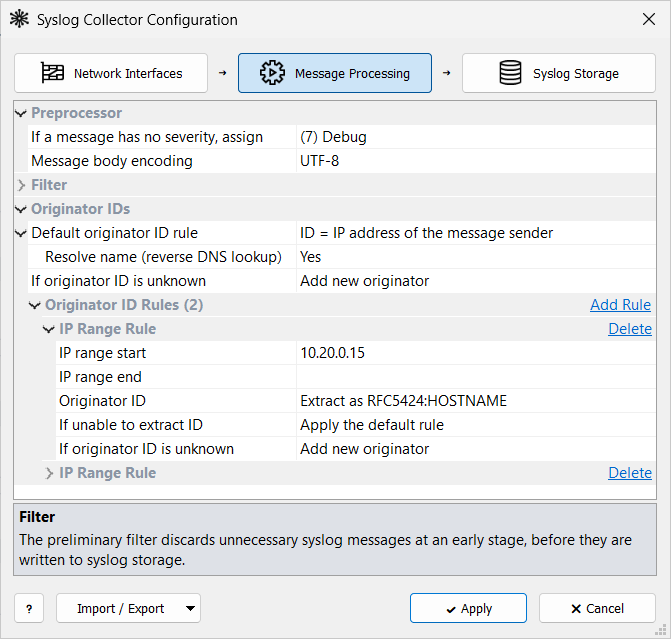
Preprocessor
The preprocessor settings apply at two points of the pipeline:
-
The severity is assigned as soon as a message is received, before the Incoming Filter.
-
The encoding is converted after the memory buffer, just before the message is written to storage.
If a message has no severity, assign
Every message in syslog storage has a severity.
The severity is carried in the <PRI> part at the start of the message.
Some originators omit it, although the syslog standards require it.
Such messages get the severity selected here, and facility 16 (local0).
Message body encoding
Syslog Watcher stores all messages in UTF-8. Most current devices and software send UTF-8, so the default UTF-8 needs no conversion.
If originators send another encoding, enter its name, for example windows-1252, Latin1, Shift-JIS, or ISO-8859-8.
The collector converts each message from that encoding to UTF-8.
-
Messages that contain only ASCII characters are not converted.
-
Messages that contain a UTF-8 byte order mark are treated as UTF-8 regardless of this setting; the mark is removed.
-
If the conversion fails (for example, the encoding name is not recognized), the message is stored unconverted. An error is written to Diagnostic Records once per encoding name until the collector restarts.
| The encoding applies to all originators; it cannot be set per originator. For mixed encodings, configure the originators to send UTF-8. |
Originator IDs
The collector assigns an originator ID to every message and uses it to find the originator in syslog storage. To learn how IDs work and when to change the default rule, with examples, see Originator ID.

| Default originator ID rule |
ID = IP address of the message sender. Applies when no originator ID rule matches the sender. |
| Resolve name (reverse DNS lookup) |
With Yes, a new originator is named after the sender’s host name when its ID is the sender’s IP address. With No, the name is the same as the ID. See How Originators Are Registered. |
| If originator ID is unknown |
Add new originator registers the originator and stores the message, within the license limit. Discard messages drops the message; it is counted as Unknown originator in Monitoring. |
Originator ID Rules
A rule takes the ID from the message itself for senders in an IP range, for example a syslog relay. To learn when to use rules and which rule applies when several match, see Originator ID Rules.
-
Click Add Rule next to Originator ID Rules (N).
-
Set IP range start and, for a range, IP range end.
-
Select how to get the Originator ID (see below).
-
Click Apply.
To remove a rule, click Delete in its header.
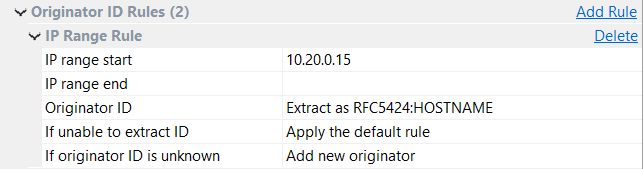
| IP range start |
First IP address of the range, for example |
| IP range end |
Last IP address of the range (inclusive). Leave it blank for a single address. |
| Originator ID |
Extract as RFC5424:HOSTNAME, Extract as RFC5424:HOSTNAME/APPNAME, or Extract with regular expression (enter it in Regular expression). The RFC 5424 options work only for messages in RFC 5424 format; for other formats, use a regular expression. IDs longer than 255 characters are truncated. |
| If unable to extract ID |
Apply the default rule uses the sender IP address. Discard messages drops the message; it is counted as No originator ID in Monitoring. |
| If originator ID is unknown |
Add new originator or Discard messages, for this range only. |
Memory Buffer
The memory buffer sits between the network interfaces and the storage writer. It holds messages so that short bursts are not lost when storage cannot keep up.
The buffer is set on the Syslog Storage tab of Syslog Collector Configuration.
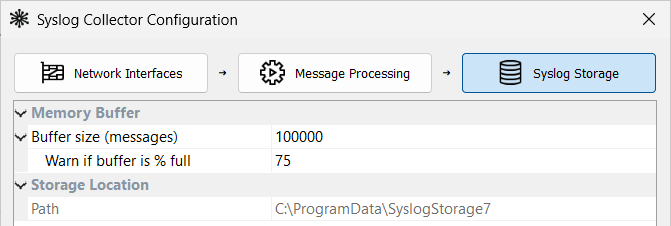
| Buffer size (messages) |
Maximum number of messages held in memory before they are written (1,000–10,000,000). A larger buffer covers longer bursts and uses more RAM. |
| Warn if buffer is % full |
At this fill level (10–99), a warning is written to Diagnostic Records and Buffer Usage on the Server tab turns red. |
When the buffer is full, new messages are discarded and counted as Buffer overflow in Monitoring.
Size the buffer for the longest burst it must absorb: at 5,000 messages per second, 100,000 messages cover about 20 seconds. A larger buffer helps only with bursts; if Buffer Usage stays high, storage is too slow for the sustained rate. For monitoring and other tuning, see Performance.
The Syslog Storage tab also shows the storage folder (read-only); change it as described in Storage Location.
Related Topics
-
Syslog Originators — registered originators, groups, and selection
-
Monitoring — buffer usage and discarded messages on the Server tab