Forward to Syslog Server
Forward to Syslog Server sends matching stored messages to another syslog server or SIEM.
| The feature reads messages from syslog storage, so slow or failing forwarding never blocks collection (see How a Feature Processes Messages). |
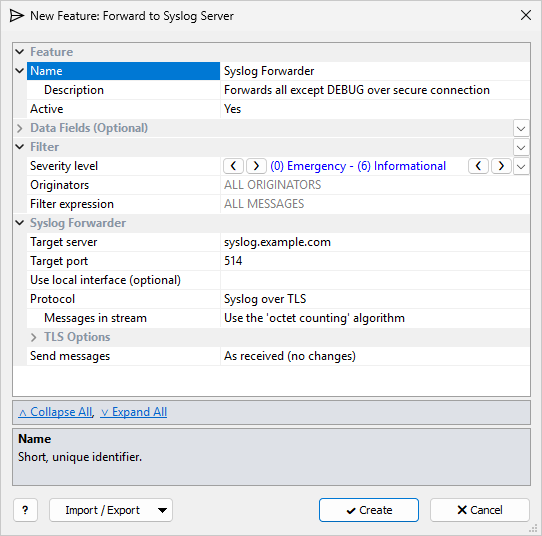
The common Feature, Data Fields, and Filter sections are described in Managing Features. This page covers the Syslog Forwarder section.
Destination
| Setting | Description |
|---|---|
Target server |
Required. IPv4 or IPv6 address or host name of the syslog server. |
Target port |
Destination port: 1–65535, default 514. |
Use local interface (optional) |
Local IP address to send from. Blank = chosen by Windows. |
Protocol |
Syslog over UDP (default), Syslog over TCP, or Syslog over TLS. |
Messages in stream |
TCP and TLS only. How messages are separated in the stream: Use the 'octet counting' algorithm (default, RFC 6587), Separate with \0, Separate with \n, or Separate with \r\n. Use the framing the receiver expects. |
TLS Options
Shown for Syslog over TLS.
| Setting | Description |
|---|---|
Protocol version |
TLS 1.0, 1.1, 1.2 (default), or 1.3. |
Verify server certificate |
OFF: Do not verify (default) or ON: Verify certificate. When on, the server certificate must chain to a Windows trusted root or the selected CA, and its name must match Target server. The default lets self-signed test receivers work; turn verification on in production. |
Certificate Authority (CA) |
Shown when verification is on. Named CA certificate from TLS Certificates. Blank = Windows trusted roots only. |
Timeout |
Connect, handshake, and I/O timeout in milliseconds: 100–60,000, default 2000. |
Certificate |
Optional client certificate from TLS Certificates, for receivers that require mutual TLS. |
Private key password |
Password for a protected private key. Use a secret string. |
Send Messages (Format)
Send messages sets how each message is formatted before it is sent:
| Option | Result |
|---|---|
As received (no changes) |
The default. The message as it arrived, with its syslog priority prefix. |
Formatted as IETF-syslog (RFC5424) |
The message rebuilt with an RFC 5424 header. |
Formatted as IETF-syslog + SD:origin (RFC5424 7.2) |
The same, plus |
In custom format |
Your own template (see below). |
With In custom format, the Message Format section has one Message template in simple mode.
Example: <{PRIORITY}>{RAW_MESSAGE} sends the message as received, including the syslog priority prefix.
Click Switch to Advanced Mode to define several Format Templates (Add Template). Each template has:
-
a Template filter (blank = ALL MESSAGES that passed the feature filter)
-
a Message template
For each message, every template whose filter matches is applied, in list order, and the results are joined into one forwarded message.
| If no template matches, an empty message is sent. |
Use several templates when originators need different output formats: give each template a filter for its originators. If each template builds a complete message, keep the template filters mutually exclusive so that only one matches. You can also use templates for optional parts: add a template for each part, with a filter that decides when the part is included.