Syslog Originators
A syslog originator is the device, server, or application that generates a syslog message — not a relay or proxy that only forwards it. Syslog Watcher links each stored message to its originator.
Each originator is a record in syslog storage with:
-
ID — identifies which originator sent a message; in simple cases, the sender’s IP address
-
Name — a human-readable name; in simple cases, the host name resolved by reverse DNS lookup
-
Parser — extracts fields from the originator’s messages (see Syslog Parsers)
-
Groups — the originator groups it belongs to
-
Active — whether the originator is in use; see Inactive Originators
The collector adds originators automatically when the first message from a new ID arrives. You can also add, edit, and delete them in Manager.
To manage originators, in the Storage section of the main toolbar, click  Originators (see Managing Originators).
To manage groups, click
Originators (see Managing Originators).
To manage groups, click  Groups (see Originator Groups).
| In Syslog Watcher 5 and earlier, an originator was called a syslog source. |
Originator ID
The originator ID is a text string that identifies the originator of a message. The collector assigns an ID to every incoming message and uses it to find the originator record. IDs are case-sensitive and cannot be changed after the originator is created.
By default, the ID is the IP address of the message sender. This works when originators send their messages directly to Syslog Watcher and keep the same IP address.
When the Default Rule Does Not Work
When messages pass through a syslog relay or proxy, every message arrives from the relay’s address, so all of them would get the same ID.
When originators get their IP addresses dynamically, for example from DHCP, an originator’s address changes over time. Each new address becomes a new ID, so one originator is split into several records. If another originator later gets an old address, its messages are stored under the wrong record.
Originator ID Rules
In both cases, add Originator ID Rules in the collector settings. A rule covers a range of sender IP addresses and takes the ID from the message itself:
-
Extract as RFC5424:HOSTNAME — the host name from the RFC 5424 header.
-
Extract as RFC5424:HOSTNAME/APPNAME — host name and application name, for one originator per application on each host.
-
Extract with regular expression — the text captured by the groups
(...)of a regular expression, joined in order without a separator. The expression can match anywhere in the message. To group without capturing, use(?:...).
The rules are checked in order; the first rule whose range contains the sender’s address applies. If the ID cannot be extracted, the rule either uses the sender IP address or discards the message.
| Message | Rule | Originator ID |
|---|---|---|
Sent directly from |
None (default) |
|
|
Extract as RFC5424:HOSTNAME for |
|
The same message |
Extract as RFC5424:HOSTNAME/APPNAME for |
|
|
Extract with regular expression |
|
|
Extract as RFC5424:HOSTNAME for |
|
| Changing the rules changes the IDs of new messages. Messages with a new ID go to a new originator, and the old originator stops receiving messages. |
How Originators Are Registered
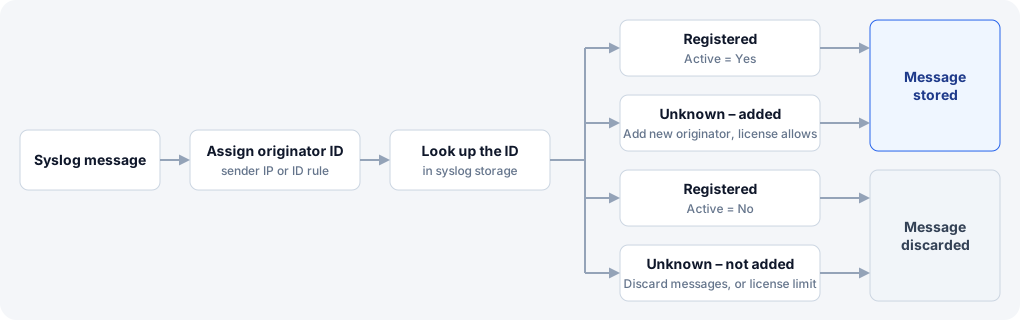
The collector assigns an originator ID to every incoming message, then looks up the ID in syslog storage:
-
Registered, Active = Yes — the message is stored.
-
Registered, Active = No — the message is discarded.
-
Unknown ID — the collector setting If originator ID is unknown decides:
-
Add new originator — the collector adds the originator and stores the message.
-
Discard messages — the message is discarded and nothing is added.
-
A new originator gets the default parser, and its Name is the same as its ID. If Resolve name (reverse DNS lookup) is Yes and the ID is the sender’s IP address, the collector then looks up the host name in the background. When the lookup succeeds, the name is replaced with the host name, unless someone has changed the name in the meantime.
License Limit
The license limits how many active originators the collector accepts. Inactive originators do not count.
-
When the limit is reached, the collector does not add new originators; messages from unknown IDs are discarded.
-
When there are more active originators than the limit allows, for example after you add them manually or the license changes, the collector stores messages only from the oldest active originators, up to the limit. Messages from the others are discarded.
Collector monitoring shows how many messages were discarded and why.
Inactive Originators
To take an originator out of use, deactivate it rather than delete it: set Active to No in the originator properties. You can deactivate several originators at once.
An inactive originator is not used anywhere:
-
The collector discards its new messages.
-
View tabs, reports, features, and the message counts on the Storage tab skip its messages, whether the filter is ALL ORIGINATORS, a group, or selected originators.
-
It does not count toward the license limit.
Its messages stay in syslog storage, and its name, parser, and groups are kept. Set Active back to Yes to use it again; its stored messages reappear.
Inactive originators are still listed in the Syslog Originators window.
Related Topics
-
Managing Originators — add, edit, and delete originators
-
Originator IDs — how the collector assigns IDs