Severity and Facility Names
Syslog severities (0–7) and facilities (0–23) are numbers. Syslog Watcher shows them with names from RFC 5424, such as Warning or local0. You can rename them to match vendor documentation or your own terms.
Renaming does not change the numbers, so severity ranges in message filters, and filter expressions that use {SEVERITY_NUM} or {FACILITY_NUM}, keep working.
Change the Names
-
In the Storage section of the main toolbar, click
 More → Severity and Facility Names…
 -
Edit a name under Severity Level Names or Facility Names. Names cannot be blank.
-
Click Apply.
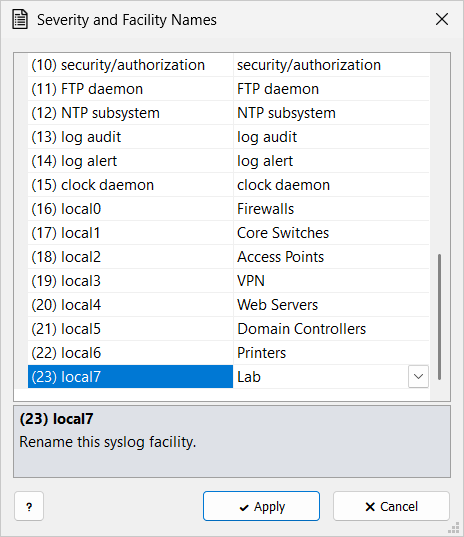
The names are kept in syslog storage.
Where the Names Appear
-
{SEVERITY}and{FACILITY}in view columns, feature templates, emails, and reports -
Severity lists in filters and on the Server and Storage tabs
A filter expression that compares {SEVERITY} or {FACILITY} with text stops matching after a rename.
Compare {SEVERITY_NUM} or {FACILITY_NUM} instead.
|
Default Names
| Severity | Name | Facility | Name |
|---|---|---|---|
0 |
Emergency |
0 |
kernel |
1 |
Alert |
1 |
user-level |
2 |
Critical |
2 |
mail system |
3 |
Error |
3 |
system daemons |
4 |
Warning |
4 |
security/authorization |
5 |
Notice |
5 |
syslogd |
6 |
Informational |
6 |
line printer subsystem |
7 |
Debug |
7 |
network news subsystem |
8 |
UUCP subsystem |
||
9 |
clock daemon |
||
10 |
security/authorization |
||
11 |
FTP daemon |
||
12 |
NTP subsystem |
||
13 |
log audit |
||
14 |
log alert |
||
15 |
clock daemon |
||
16–23 |
local0 … local7 |