Syslog Messages
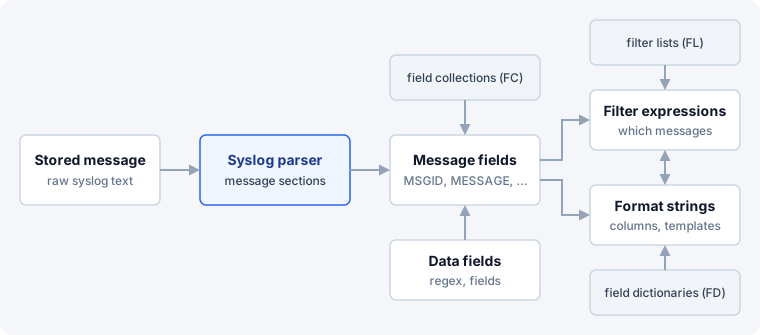
Syslog Watcher keeps each message in syslog storage as it was received. When a view tab, feature, or report reads a message, the originator’s syslog parser splits it into message fields. Filter expressions use those fields to select messages; format strings print them into view columns, files, emails, and requests.
Parsers and Fields
-
Syslog Parsers split a message into fields such as
TIMESTAMP,HOSTNAME, andMSGID. -
Message Fields lists the built-in fields, such as
RECEIVED,SEVERITY, andMESSAGE. -
Severity and Facility Names changes the names printed for severities and facilities.
Field Extraction
-
Field Extraction adds fields from the message body, in the Data Fields (Optional) section of features, view layouts, parsers, and report templates.
-
Field Collections give names to the values in vendor messages, with a rule for each message type.
Filtering
-
Filtering selects messages by severity, originators, and a filter expression.
-
Filter Expressions combine fields, operators, and
and/or/not. -
Filter Lists are named value lists for
IN/NOT_IN.
Formatting
A format string is text with fields, for example {RECEIVED|%F} {ORIGINATOR_NAME}: {MESSAGE}.
-
Field Modifiers cut, change case, extract, or look up a value.
-
Date/Time Modifiers format
RECEIVEDtimestamps. -
Escape Modifiers make a value safe for SQL, CSV, HTML, JSON, URLs, command lines, and file names.
-
Field Dictionaries are lookup tables that replace a field value with text, for example an explanation of a message ID.
Related Topics
-
Syslog Originators — choose the parser for each originator in its Parser property