Features
A feature is a background task of the Syslog Watcher Server service. It reads syslog messages that are already in syslog storage and sends the matching ones somewhere else: files, a database, another syslog server, email, an HTTP endpoint, or a program.
Use features when Syslog Watcher must do more than store logs, for example to forward a filtered stream to a SIEM, keep a text copy for another product, or email alerts for high-severity events.
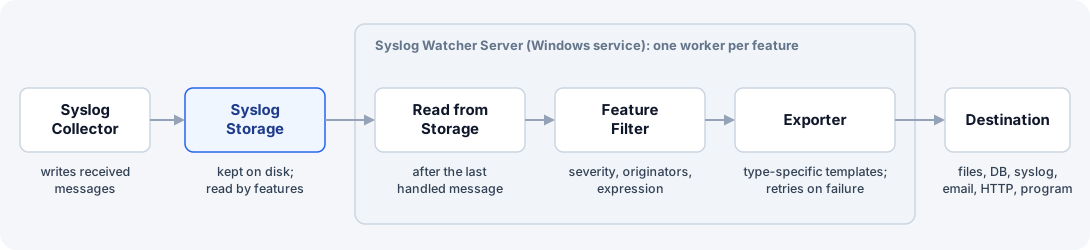
How a Feature Processes Messages
Features are not part of the syslog collector. The collector writes messages to storage; features read them from storage later. Collection therefore continues while a feature is slow, suspended, or failing; the feature catches up later.
Each active feature that is not suspended works like this:
-
It reads messages from storage, starting after the last message it handled.
-
It applies the feature filter: severity, originators, and an optional expression.
-
It passes the matching messages to its exporter, which formats them and sends them to the destination.
If the destination fails, the feature retries the same message until it succeeds; it does not skip it. See Monitoring Features.
| Messages that do not match the filter are skipped permanently. The feature reads them again only if you resume it from an earlier date and time. |
New features start suspended. Resume a feature to start processing.
Feature Types
| Type | What it does |
|---|---|
Writes messages to text files, for example one file per day or one folder per originator. |
|
Runs SQL commands (usually |
|
Forwards messages to another syslog server over UDP, TCP, or TLS. |
|
Sends email alerts for messages that match email rules. |
|
Sends one HTTP request (POST or PUT) per message to an HTTP endpoint, such as a webhook or an API. |
|
Starts a program or script for each matching message. |
Related Topics
-
Managing Features — add, configure, suspend, resume, delete, import, and export
-
Monitoring Features — status, counters, and errors on the Server tab
-
Syslog Collector — how messages get into storage