Network Interfaces
A network interface is a listener on a local IP address that accepts syslog messages. Each interface uses one transport: UDP, TCP, or TLS. Several interfaces can run at once, for example UDP for older originators and TLS for originators that must encrypt their logs.
The collector needs at least one interface; without one it receives nothing.
A new installation has one UDP interface on all IPv4 addresses (0.0.0.0), port 514.
Managing Network Interfaces
Network interfaces are configured in Syslog Collector Configuration:
-
In the Server section of the main toolbar, click
 Collector → Syslog Collector Configuration…
The Collector button is shown when Manager is connected to a local or remote server.
Collector → Syslog Collector Configuration…
The Collector button is shown when Manager is connected to a local or remote server. -
Open the Network Interfaces tab.
-
Add, change, or delete interfaces. To remove an interface, click Delete Interface in its header.
-
Click Apply.
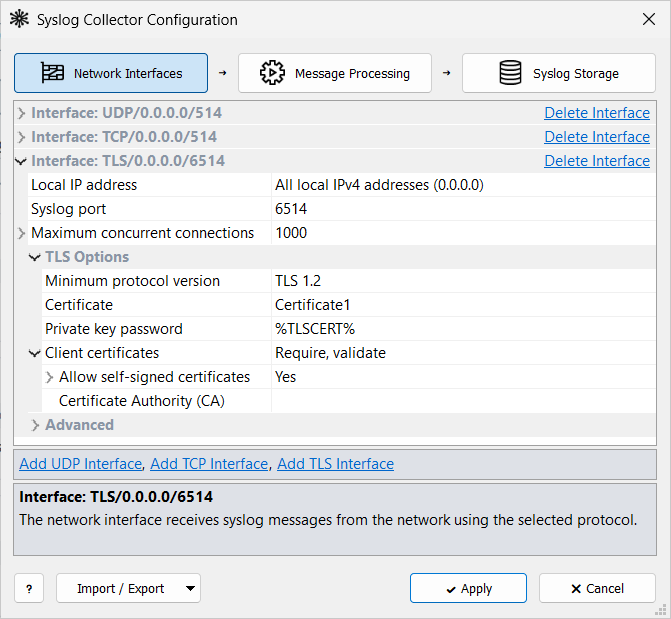
If you are not allowed to change the configuration, the window title ends with (Read Only) and Apply is disabled. This happens when:
-
► Local server: Manager is not running as Administrator, so it cannot save the configuration file.
-
► Remote server: your account’s role does not allow changing the collector configuration. By default, only the Admin role does.
Leave the advanced settings unchanged unless a specific problem requires a change.
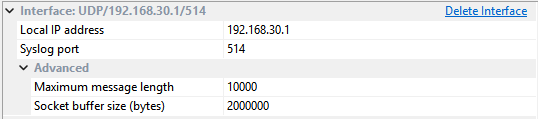
UDP Interface
UDP is the usual syslog transport. It is connectionless: originators send datagrams with no session. Port 514 is the IANA default (RFC 5426).
UDP is simple and widely supported, but delivery is not guaranteed and the payload is not encrypted. Use it when compatibility matters more than reliable, encrypted delivery.
TCP Interface
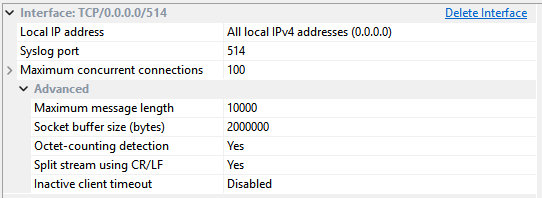
TCP adds a persistent connection, ordered delivery, and flow control. Port 514 is the IANA default (RFC 6587) — the same number as UDP, but a different protocol.
The originator must support syslog over TCP. TCP does not encrypt the data. Use it when message loss on the network path is not acceptable.
Adding a TCP Interface
-
Click Add TCP Interface.
-
Set Local IP address and Syslog port as for a UDP interface.
-
If needed, adjust Maximum concurrent connections (see TCP and TLS Connections).
-
Click Apply.
TLS Interface
TLS encrypts syslog over TCP. Port 6514 is the IANA default (RFC 5425).
The collector presents a server certificate; originators can be required to present client certificates. Use TLS when logs must not cross the network in clear text.
Adding a TLS Interface
-
Click Add TLS Interface.
-
Set address, port, and connections as for a TCP interface. The initial port is 6514.
-
Under TLS Options, select a Certificate, as described in Syslog over TLS.
-
Click Apply.
If no certificate is selected, Apply offers to generate a self-signed one.
TCP and TLS Connections
TCP and TLS interfaces limit how many originators can be connected at the same time.
| Maximum concurrent connections |
Maximum number of syslog clients connected at the same time (1–59999). The operating system can set a lower limit. |
| Replace older connections |
When the limit is reached, Yes disconnects the oldest client so the new one can connect. No refuses the new client. |
Choosing Port Numbers
The usual ports are 514 for UDP and TCP, and 6514 for TLS. The collector must listen on the same port and transport the originators send to. Firewalls on the path must allow that port and protocol.
A UDP interface can share an address and port with a TCP or TLS interface, because they are different transports. Example: UDP 514 and TCP 514 together.
| TCP and TLS interfaces cannot share an address and port, because TLS runs over TCP. Two interfaces of the same transport cannot share them either. |
Related Topics
-
Monitoring — interface status and counters
-
Troubleshooting — no messages arrive