Originator Groups
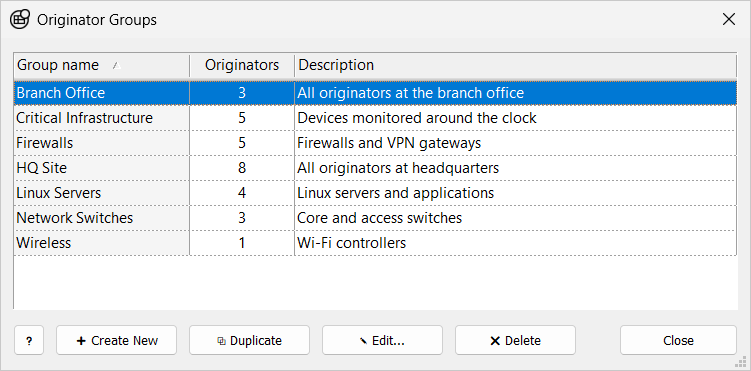
An originator group is a named set of originators. A message filter in a feature, view tab, or report can select a group (Group: <name>) instead of listing originators one by one. When you add an originator to a group, every filter that uses the group includes it.
An originator can belong to more than one group.
To open the Originator Groups window, in the Storage section of the main toolbar, click  Groups.
| Filters refer to a group by its name. If you rename or delete a group, filters that use the old name match no originators until you select a group again. |
Create a Group
-
Click Create New or press Insert. To start from an existing group, select it and click Duplicate instead.
-
In the New Group window, change the Name and add a description if needed.
-
Next to Originators, click Select Originators…, check the members in the Select Originators window, and click Apply.
-
Click Create.
You can also add an originator to groups from its Groups property.
Edit a Group
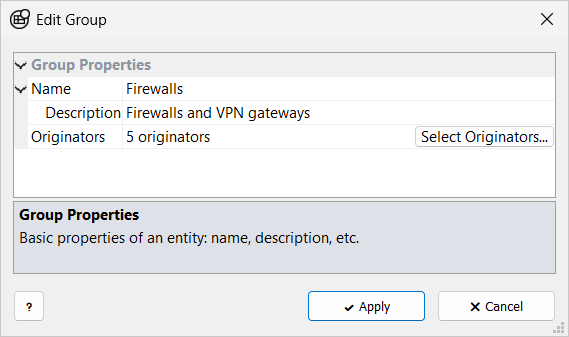
Select a group and click Edit…, double-click it, or press Enter. Change the properties and click Apply.
| Name |
Required; must be unique. |
| Description |
Optional comment, shown under Name. |
| Originators |
The members, shown as a count (for example 3 originators). Click Select Originators… or double-click the value to change them. |
Delete a Group
Select a group, click Delete or press Delete, and confirm with OK. The originators in the group are not deleted.
Read-Only Access
You cannot change groups when the storage folder is open read-only, or when your role on a remote server is Observer. In that case:
-
The Originator Groups window title shows (Read Only). Create New, Duplicate, and Delete are unavailable, and Edit… becomes View….
-
The group properties window is titled Group (Read Only), and Apply is unavailable.