Field Dictionaries
A field dictionary is a lookup table of keywords and their replacement text.
The FD: and FDX: modifiers replace a field value with the text for that keyword.
Typical uses:
-
► Add the vendor’s explanation and recommended action to a message ID, in an email or in the view details panel.
-
► Translate codes to readable names, for example protocol
6→TCPor port443→HTTPS. -
► Explain Windows event IDs, for example
4625→An account failed to log on. -
► Show where an originator is and who owns it:
{ORIGINATOR_ID|FD:sites}→Building 2, rack B3 (Network team). -
► Group message IDs into categories and filter by category:
{MSGID|FD:asa_categories} = "VPN". -
► Convert a severity to the priority of a ticketing or monitoring system:
{SEVERITY_NUM|FD:ticket_priority}→P1. -
► Sort exported files into a folder per site:
{ORIGINATOR_ID|FD:site_codes}in the Subfolders template of Export to Files. -
► With
FDX:, use a different text layout for each message type:{MSGID|FDX:asa_layouts}.
Field Dictionaries Window
In the Storage section of the main toolbar, click  More → Field Dictionaries…
The list is grouped by From: Installation (read-only, shipped with the product) and Syslog Storage.
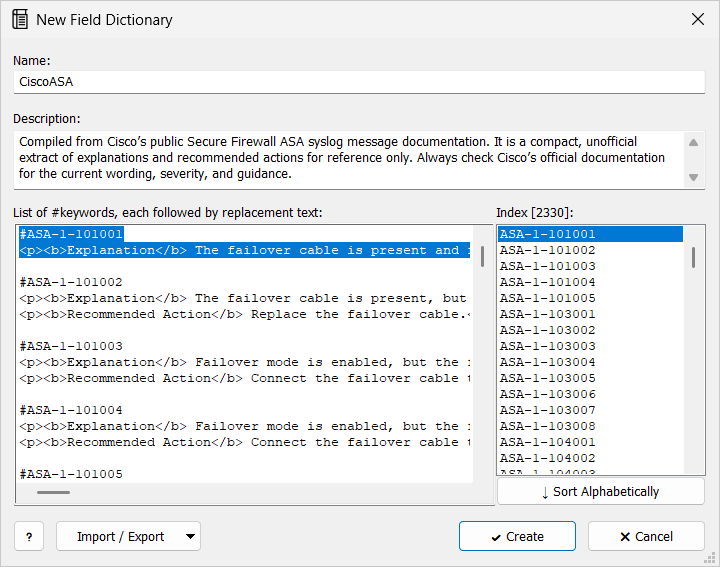
The installation includes CiscoASA, with HTML explanations and recommended actions for Cisco ASA message IDs (ASA-1-101001, …).
Field Dictionary
| Setting | Description |
|---|---|
Name: |
Required, unique.
This is the name after |
Description: |
Optional. |
List of #keywords, each followed by replacement text: |
Each keyword on its own line starting with |
Example:
#6
TCP

#17
UDP

#
other
The Index list shows the keywords and the default as [DEFAULT]. Click a keyword to jump to its entry. Sort Alphabetically puts the entries in keyword order.
Import / Export reads or writes a field dictionary file (.fd).
Use a Dictionary
{FIELD|FD:name} looks up the value of FIELD and prints the replacement text.
If the keyword is missing, the default text is printed (empty when there is no default).
{FIELD|FDX:name} does the same, but treats the replacement text as a format string, so it can contain other fields.
Examples:
{MSGID|FD:CiscoASA}
{proto|FD:ip_protocols}
Other modifiers can come before the lookup, for example {MSGID|UPPER|FD:codes}.