Syslog Watcher Manager
Syslog Watcher Manager is the Syslog Watcher desktop application. Use it to view messages, check status, and change settings. It connects to one Syslog Watcher Server at a time, on this computer (local) or on another computer (remote). The Collector and the Server are Windows services and keep running after you close Manager.
Connect to the Local Server
By default, Manager connects to the local server when it starts (Auto-connect to local server in Manager Settings).
Otherwise, in the Server section of the main toolbar, click  Local.
The button appears only when the Server is installed on this computer.
Local.
The button appears only when the Server is installed on this computer.
| Roles do not apply to Manager on the server computer. What it can do depends on the Windows account that runs it. |
Connect to a Remote Server
The remote server must have remote access enabled and a user account for you.
-
If Manager is connected to a server, disconnect first.
-
In the Server section of the main toolbar, click
 Remote.
 -
In the Remote Syslog Watcher Server window, fill in the connection settings.
-
Click Connect.
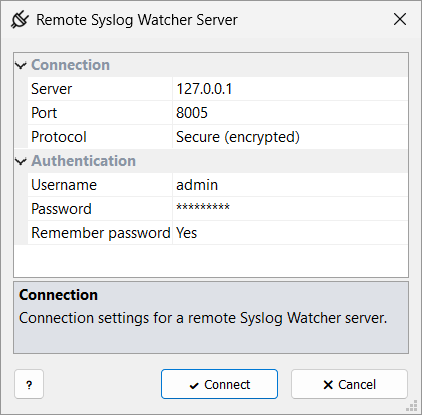
| Server |
IP address or host name of the Syslog Watcher Server computer. |
| Port |
The Port set on the server. |
| Protocol |
The same as Connection on the server. |
| Username |
A remote access user on the server. |
| Password |
That user’s password. |
| Remember password |
Yes saves the password for the next connection. It is stored encrypted for your Windows account. |
Work in a Remote Session
In a remote session, you work with the server’s syslog storage, features, originators, and configuration, within the limits of your role.
Some actions run on the server computer, not on the Manager computer, for example, test emails, test HTTP requests, and storage maintenance. Generate Report Now… is not available remotely. Schedule the report instead.
Disconnect
In the Server section of the main toolbar, click Server → Disconnect and confirm.
The Local and Remote buttons appear again.
Use Manager as a Storage Reader
Manager can also work with no server at all, as a reader for syslog storage. It opens a storage folder directly, for example an extracted storage archive, a storage copied from another computer, or a Syslog Watcher 6 storage. You can view and search messages and generate reports.
General Section
 Manager Manager
|
Open the Manager settings. |
 Updates Updates
|
Check for newer product versions. See Product Updates. |
 Support Support
|
Open Product Support. |
Help
Click  in a tab or window to open the User Guide page about it.
Press F1 in the main window to open the User Guide start page.
in a tab or window to open the User Guide page about it.
Press F1 in the main window to open the User Guide start page.
If the offline User Guide is installed, Help opens its pages from disk, with no Internet access needed. Otherwise, Help opens the online guide.