Execute Program/Script
Execute Program/Script starts a program for each matching message and passes message fields as command-line parameters. Use it to run:
-
► a PowerShell or batch script
-
► a vendor CLI
-
► an in-house tool that has no syslog, file, or HTTP interface
| The feature reads messages from syslog storage, so a slow or failing program never blocks collection (see How a Feature Processes Messages). |
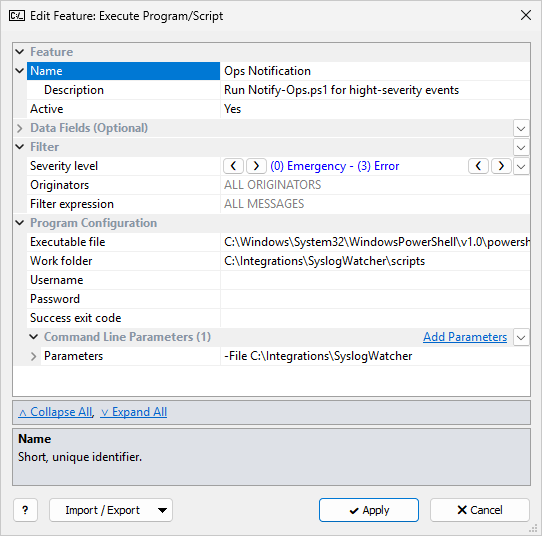
The common Feature, Data Fields, and Filter sections are described in Managing Features. This page covers the Program Configuration section.
Program Configuration
| Setting | Description |
|---|---|
Executable file |
Required.
Path of the program on the server computer.
Click |
Work folder |
Working folder for the process. Blank = the working folder of the Syslog Watcher Server service. |
Username |
Windows account that starts the process: |
Password |
Password for Username; ignored when Username is blank. Use a secret string instead of the password itself. |
Success exit code |
Blank: any exit code means success. A number: only that exit code means success. |
The process runs without a window. The feature waits for it to exit, up to 10 seconds, before it processes the next message. If the program does not exit in time, the feature ends it. If the program cannot start, times out, or returns an exit code other than Success exit code, the feature is marked Failed and retries the same message.
Command Line Parameters
In simple mode, Command Line Parameters has one Parameters template. The command line is the quoted Executable file path followed by the parameters. Example:
-File C:\Integrations\SyslogWatcher\scripts\Notify-Ops.ps1 {ORIGINATOR_ID|EscCMD} {MESSAGE|70|EscCMD}
EscCMD escapes a value for the Windows command line.
It adds double quotes only when the value contains spaces or ", so do not put extra quotes around the field: {MESSAGE|EscCMD} is enough.
Without EscCMD, message text is inserted into the command line as is, and a crafted syslog message can add its own parameters.
Use EscCMD on every message field that is not fully under your control.
|
Click Switch to Advanced Mode to define several parameter groups (Add Parameters). Each group has:
-
a Filter (blank = ALL MESSAGES that passed the feature filter)
-
a Parameters template
For each message, the parameters of every group whose filter matches are joined, in list order, into one command line. The program still starts once per message.
| If no group matches, the program starts without parameters. |
Use several groups when originators need different parameters, or when some parameters apply only to some messages, for example an extra flag for severity Error and higher.
Notes
-
To run a script (
.ps1,.bat,.cmd), set Executable file to the interpreter (powershell.exe,cmd.exe) and put the script path in the parameters. -
Local System cannot see mapped drive letters; use UNC paths or run the process under another account.
-
A broad filter can start many processes; keep the feature filter narrow.