View/Search Presets
A View/Search preset is a saved set of settings for a new view tab: time range, filter, layout, page size, and sorting. Use presets for searches you run often, instead of filling in the request each time.
Presets are saved in syslog storage, so they are shared: every user who connects to the server sees and uses the same presets.
Create a Preset
-
In the Messages section (the main toolbar), click
 View/Search →
  Manage View/Search Presets…
 -
Click Create New, or select a preset and click Duplicate to start from a copy.
-
Give the preset a Name; it is shown in the View/Search drop-down.
-
Set the time range, filter, layout, page size, and sorting; see View/Search Preset.
-
Click Create.
Use a Preset
In the Messages section (the main toolbar), click View/Search.
The drop-down lists presets as Preset: <name> (up to 20).
Clicking one opens the New View Tab window filled in with the preset settings. You can still change any setting, for example narrow the time range, before you click Request to open the tab.
View/Search Presets Window
In the Messages section (the main toolbar), click View/Search → Manage View/Search Presets…
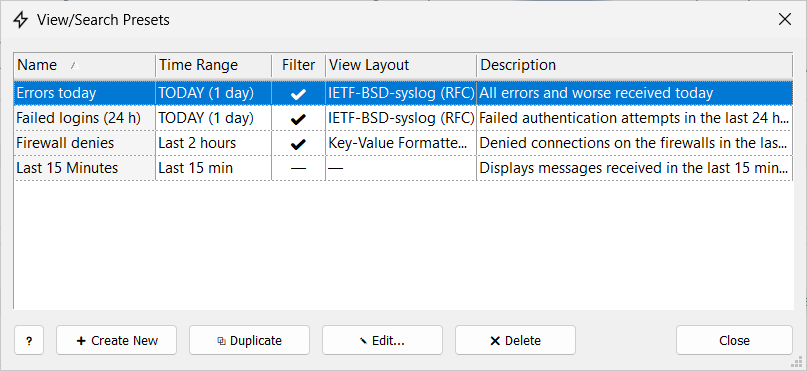
The window lists all presets saved in syslog storage; here you can create, edit, duplicate, and delete them.
View/Search Preset
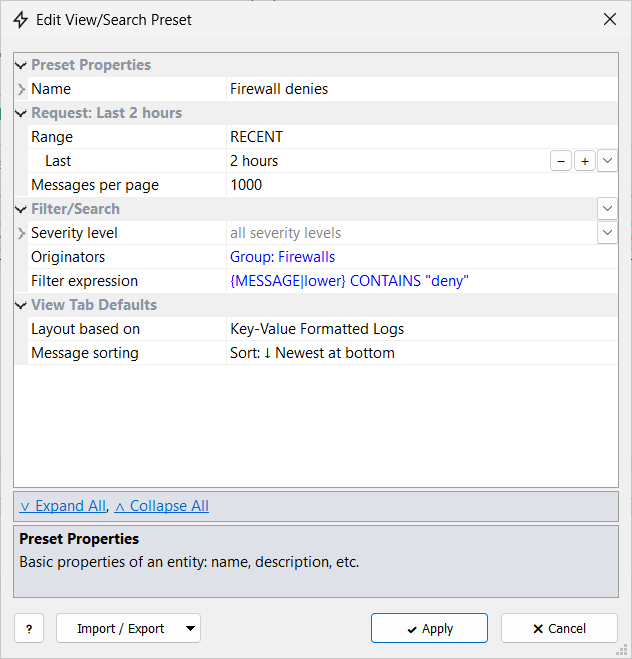
Import / Export saves the preset to a JSON file (Export to File…) or loads one (Import from File…).
Request
Range |
Time range of the new tab; see Time Range. |
Messages per page |
Page size of the new tab; see Open a View Tab. |
| TODAY, YESTERDAY, and RECENT (for example the last 2 hours) are the most useful ranges for a preset: they are counted from the moment the tab is opened, so the preset always shows current messages. A CUSTOM range is saved as fixed dates, so the preset always shows the same period. |
Filter/Search
Severity level |
Severities to load. |
Originators |
Originators or an originator group to load. |
Filter expression |
An expression that messages must match. |
See Filtering.
View Tab Defaults
Layout based on |
View layout of the new tab. |
Message sorting |
Sort: ↓ Newest at bottom or Sort: ↑ Newest at top; see Tab Menu. |