Server Diagnostics
The Syslog Watcher Server writes its own diagnostic records: startup, license, features, reports, storage maintenance, and remote access. They are separate from the collector’s diagnostic records.
Diagnostic Records (Server)
In the Server section of the main toolbar, click  Server → Diagnostic Records (Server).
A Diagnostics (Server) tab opens.
Server → Diagnostic Records (Server).
A Diagnostics (Server) tab opens.
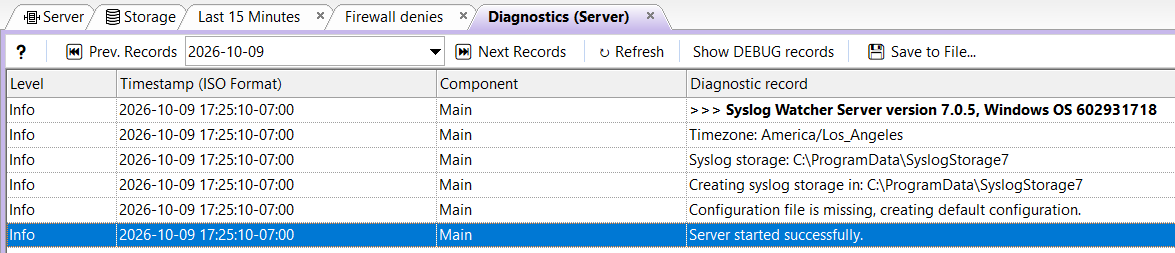
Records are kept in one file per day. The tab opens on the latest day.
 Prev. Records Prev. Records
|
Show the records of the previous (older) day. |
| Date drop-down |
Jump to a day. |
 Next Records Next Records
|
Show the records of the next (newer) day. |
 Refresh Refresh
|
Reload the records of the selected day. |
| Show DEBUG records |
Show all records, including Debug ones, or only the important ones. |
 Save to File… Save to File…
|
Save the records of the selected day to a |
Typical records: feature failures and recoveries, report generation results, storage files deleted by retention, archive syncs, and the result of the command run after a sync.
Email Diagnostic Records
The server can email new critical, error, and warning records from both the server and the collector.
-
In the Server section of the main toolbar, click
Server →  Server Configuration…
 -
Select the Server page and find Diagnostics.
-
Set Email error diagnostic records to Yes.
-
Fill in Send emails to and Use email account.
-
Click Apply.
| Setting | Description |
|---|---|
Email error diagnostic records |
Yes sends warning, error, and critical records by email. |
Send emails to |
Comma-separated recipient addresses. Required when sending is on. |
Use email account |
One of the email accounts. Required when sending is on. Manage Email Accounts… on the same page opens the Email Accounts page. |