Migrate from Version 6
If Syslog Watcher 6 is installed on the same computer, Syslog Watcher 7 can migrate its configuration and license and keep using its syslog storage.
Messages are not copied or converted. The version 6 message files stay in place, and Syslog Watcher 7 writes new messages to the same folder in its own format. It reads both formats, so view tabs, searches, and reports include old and new messages.
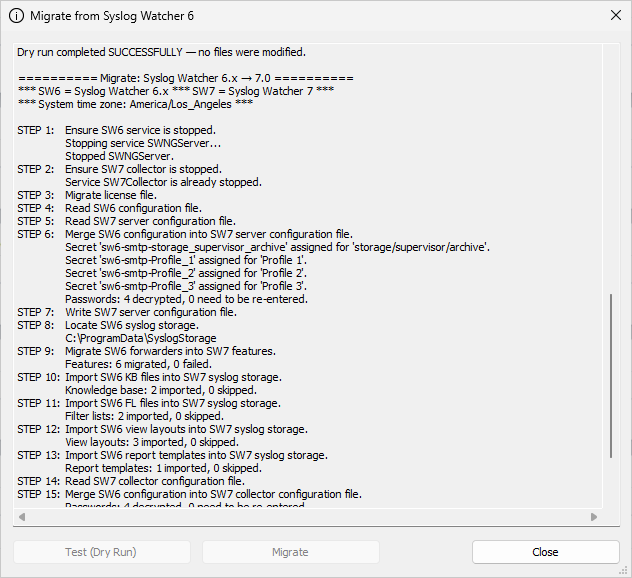
If Manager finds Syslog Watcher 6 when it connects to the local server, it opens the Migrate from Syslog Watcher 6 window.
Migrate
-
Click Test (Dry Run). The log lists what can be converted and any warnings. Nothing is changed: no services are stopped, no files are written, and no license is installed.
-
Click Migrate, then click Yes to confirm.
-
Wait until the log shows Migration completed SUCCESSFULLY. A message reminds you that retention is turned off; click OK.
-
Check the storage limits and turn retention back on (see Turn Retention On).
-
Start the collector: in the Server section of the main toolbar, click
 Collector → Start Syslog Collector.
The migration log is saved to C:\ProgramData\SyslogWatcher7\sw6_migration.log.
After a successful migration, the window is not shown again.
If the migration finishes with errors, review the log; the window opens again the next time Manager starts.
Turn Retention On
|
Migration turns off storage and archive retention, so nothing is deleted until you review the limits. |
-
In the Storage section of the main toolbar, click
 Storage → Storage Settings… and check the migrated limits.
 -
In the Server section, click
 Server →
  Server Configuration…, open Storage Maintenance, and turn on Enforce storage limits.
 -
If the storage archive is used, check its settings on the same Storage Maintenance page. If the version 6 archiver was active, migration sets Synchronize archive to Daily and keeps the version 6 Archive location and Keep archive files for (days). To delete old archive files again, set Limit archive retention to Yes, delete older archive files.
What Migrate Does
-
Stops the version 6 server service (
SWNGServer) and sets its startup type to Manual, so it does not start with Windows. -
Moves the Syslog Watcher 6 license, if any, to Syslog Watcher 7.
-
Converts the Syslog Watcher 6 configuration to Syslog Watcher 7: collector settings, email accounts, and storage and archive settings.
-
Saves passwords from the version 6 configuration as secret strings.
-
Imports the version 6 TLS and CA certificates for syslog over TLS and TLS forwarding into TLS Certificates.
-
Converts version 6 forwarders to features.
-
Imports knowledge-base files, filter lists, view layouts, and report templates.
-
Points Syslog Watcher 7 at the version 6 storage folder.
If a migrated password does not work, enter it again as a secret string in the Server section of the main toolbar:  More → More →  Secret Strings…
Then select that secret in the password setting, or type Secret Strings…
Then select that secret in the password setting, or type %Name%.
|
|
Do not start the Syslog Watcher 6 server after a successful migration: Syslog Watcher 7 now uses its storage folder. |