Send HTTP Requests
Send HTTP Requests sends one HTTP/1.1 request for each matching message. Use it for webhooks, ticketing APIs, SMS gateways, and other HTTP integrations.
| The feature reads messages from syslog storage, so a slow or failing web service never blocks collection (see How a Feature Processes Messages). |
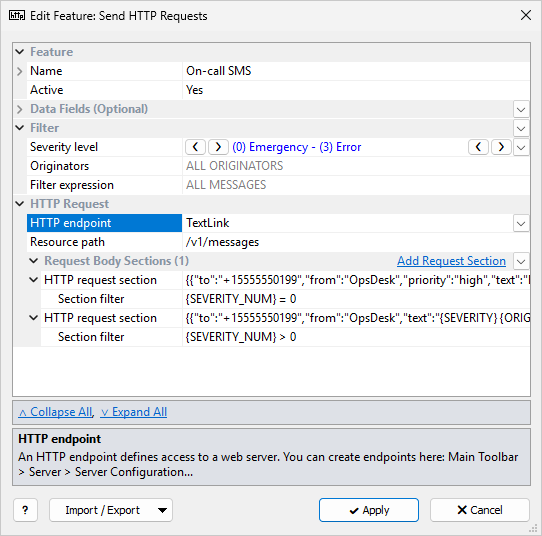
The common Feature, Data Fields, and Filter sections are described in Managing Features. This page covers the HTTP Request section.
HTTP Request
| Setting | Description |
|---|---|
HTTP endpoint |
Required. A named HTTP endpoint from Server Configuration. The endpoint sets the web server address, TLS, authentication, headers, and Request type (POST or PUT). If the list shows No HTTP endpoints, create an endpoint first. |
Resource path |
Required.
Path on the web server; message fields are allowed.
Examples: |
Request Body
In simple mode, Request Body has one HTTP request body template.
Example: {MESSAGE|70} sends the first 70 bytes of the message text.
Click Switch to Advanced Mode to define several Request Body Sections (Add Request Section). Each HTTP request section has:
-
a Section filter (blank = ALL MESSAGES that passed the feature filter)
-
an HTTP request body template
For each message, every section whose filter matches is applied, in list order, and the results are joined into one request body. The feature still sends one request per message, not one per section.
| If no section matches, the request is sent with an empty body. |
Use several sections when originators need different request formats, or when the body depends on severity, for example a high-priority SMS for Emergency and a standard SMS for Alert to Error. If each section builds a complete JSON object, keep the section filters mutually exclusive so that only one matches. You can also use sections for optional parts: add a section for each part, with a filter that decides when the part is included.
JSON Body
For a JSON body, put message fields inside JSON string values and apply EscJSON, so that quotes, backslashes, and line breaks in the message do not break the JSON:
{{"from":"{ORIGINATOR_ID|EscJSON}","sev":{SEVERITY_NUM},"msg":"{MESSAGE|EscJSON}"}}
In HTTP request body, a single { starts a message field.
Write {{ and }} for the literal braces of a JSON object.
|
| Check the endpoint and the body format first with Send Test Request on the endpoint. |
Notes
-
Requests are sent from the Syslog Watcher Server computer, not from Manager. DNS, the firewall, and TLS must work there.
-
A response status outside 200–299, or a connection error, marks the feature Failed on the Server tab. The feature retries the same message; it does not skip it.