Send Emails
Send Emails sends email alerts for matching syslog messages. Each Send Emails feature has its own filter, recipients, and email rules.
| The feature reads messages from syslog storage, so a slow mail server never blocks collection (see How a Feature Processes Messages). |
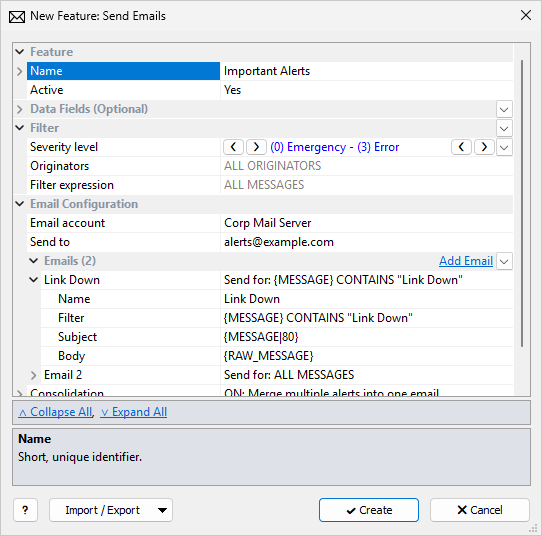
The common Feature, Data Fields, and Filter sections are described in Managing Features. This page covers the Email Configuration section.
A message must pass the feature filter before the email rule filters are checked. Put broad conditions (severity, originators) on the feature filter and per-alert conditions on the email rules.
Email Configuration
| Setting | Description |
|---|---|
Email account |
Required. An email account from Server Configuration. If the list shows No email accounts, create an account first. |
Send to |
Required.
Recipients, separated by commas or semicolons.
Both |
Email Account
Create SMTP accounts in Email Accounts (Server Configuration).
| Click Test Account on the account before relying on the feature. |
Emails (Rules)
Each Email in the Emails list is a rule: a filter, a subject, and a body. Click Add Email to add one (up to 100). The list shows each rule’s filter after Send for:.
| Setting | Description |
|---|---|
Name |
A name that describes the alert, for example |
Filter |
Filter expression for this rule. Blank = ALL MESSAGES that passed the feature filter. |
Subject |
Format string for the email subject.
Example: |
Body |
Format string for the email text.
Emails are sent as plain text.
Example: |
One syslog message can match several rules. All alerts from that message go into the same email, even if that exceeds Maximum merged emails.
Consolidation
| Setting | Description |
|---|---|
Consolidation |
OFF: One email per alert (only with a single email rule) or ON: Merge multiple alerts into one email. With two or more rules, it is always on. |
Maximum merged emails |
Shown when consolidation is on. Maximum number of alerts in one email: 2–10,000, default 100. Alerts from one syslog message that match several rules can still exceed it. |
Email subject |
Shown when consolidation is on.
Subject of a merged email; |
Delay between emails |
Minimum time between emails, in seconds, to reduce the load on the mail server: 0–3600, default 1. 0 = no delay. Alerts are held until the next email is due, not dropped. |
Filters and Rules
One Feature or Several
One Send Emails feature is enough in most cases. Add another feature for different recipients, or to suspend one set of alerts without stopping the others.
Narrow the Feature Filter
Set severity and originators on the feature filter.
They use storage indexes.
Keep slower tests, such as {MESSAGE} CONTAINS ..., in the rule Filter, which sees only the messages that passed the feature filter.
Combine Rules That Send the Same Text
If two rules have the same subject and body, use one rule and combine the filters. For example, these two filters:
{MSGID} = "LINK-3-UPDOWN"
{MSGID} = "LINK-3-TOOSMALL"
can be one rule:
{MSGID} = "LINK-3-UPDOWN" or {MSGID} = "LINK-3-TOOSMALL"
Use Filter Lists
When a rule compares a field with many values, a filter list is easier to maintain and faster than a long or chain.
Example: {MSGID} IN "link_events"
Troubleshooting
If emails do not arrive:
-
Click Test Account on the email account to check that Syslog Watcher Server can send email.
-
On the Server tab, check the feature status and its error row.
-
Check the feature: Active is Yes, it is not suspended, Email account and Send to are set, and there is at least one Email.
-
Copy the feature filter (drop-down button on the Filter section) and use it in a view tab for a time range that should contain matching messages. Check that the view tab shows them.
-
If these checks pass, contact technical support with the details and a support data file.